
study guide · web servers in 14 stages
Web servers
through the F1 lens.
This guide teaches, in 14 stages, the path a request takes from the browser to the application and how to configure each piece of that path. You begin by understanding what a web server is for, how HTTP evolved from version 1.1 to HTTP/3 and the difference between a forward proxy and a reverse proxy; then you study Apache's processing models (MPMs), Nginx's event-driven architecture, load balancing with its algorithms and health checks with failover and diagnosis of 502 and 504. On Kubernetes, you publish services with Ingress and automatic TLS through cert-manager and, with Istio, you study the service mesh architecture, gradual deployment with VirtualService and DestinationRule, and mTLS with authorization and observability; finally, you calculate availability targets (SLA and SLO), test the failover of a virtual IP with Keepalived and protect the edge with a WAF, rate limiting and HSTS. Before the stages, the next section introduces the F1 lens of the guide: a general comparison that shows the same path working inside a Formula 1 team.
Each stage depends only on what was explained before it and ends with a small exercise that proves you understood. Servers are learned by taking pieces down and bringing them back up on purpose, so do not skip the "Hands-on" blocks.
What you need: a terminal with curl and Docker (with Compose v2), which are enough for Stages 01 to 07, 13 and 14. Stages 08 to 12 run on Minikube and build on what the Kubernetes guides teach: Pods, Deployments, Services and kubectl with declarative YAML come from the Kubernetes basics guide, and Helm, used here to install cert-manager, is introduced in the advanced Kubernetes guide. If those topics are new to you, study those guides before Stage 08.
How to use this guide: keep a terminal open next to the text. The labs assume Linux (Ubuntu or Debian), Docker with Compose v2 (the docker compose command), curl, python3 and openssl. The ab utility (Apache Bench) comes in the apache2-utils package (sudo apt install apache2-utils). Organize the files in one folder per stage (etapa01/, etapa02/ and so on), because names such as compose.yaml and nginx.conf repeat, and run docker compose down at the end of each stage before moving on. When an example shows the expected output, compare it with yours: versions, IPs, timings and counts will vary, and the structure of the output is what matters. Shortened outputs are marked with (...), and outputs that depend on a version or on the environment are shown as approximate.
What runs where: Stages 01 to 07, 13 and 14 run on Docker (Compose), without installing nginx or apache2 on your computer. Stage 04 brings, besides the Docker path, the equivalent commands for an Apache installed on the host (sudo apt install apache2), and Stage 05 can be repeated with an Nginx installed on the host (sudo apt install nginx). Stages 08 and 09 run on Minikube (with the ingress addon and cert-manager installed by Helm). Stages 10, 11 and 12 run on Minikube with Istio installed by istioctl; a profile with 4 CPUs and 8 GB of memory is recommended, adjusted to what your machine has. These stay read-only: issuing real certificates with Let's Encrypt (it requires a public domain), the circuit breaking policy with endpoint ejection and trace collection with Jaeger (it requires configuring a tracing provider). Stage 13 uses Docker on Linux, with network permission (NET_ADMIN) for Keepalived.
The F1 lens of this guide
An F1 team seen from its front door
The Kubernetes guides presented the cluster as a Formula 1 team on a Grand Prix weekend. On the pit wall (the gantry facing the track) sit the engineers who decide, in the garages are the mechanics who execute, and the cars on the track do the work. Each car is called by its race number, the number that appears on the radio and in the timing, even when the chassis underneath it is swapped. This guide looks at the same team from another angle: where requests and people enter it, where they pass through and who answers. Around the garages is the paddock, the teams' work area, closed to the public. Only people with a credential get in, and entry is through turnstiles that read each person's pass.
Inside the paddock, each team has a reception in its hospitality area (the motorhome, the structure where the team receives press and guests). Every request from outside arrives there. What is already ready, such as the press release or the session timing sheet, the reception hands over on the spot. The rest it forwards to whoever resolves it: a technical question goes to the responsible engineer, and the answer comes back through the reception. Whoever asked does not know which engineer answered or how many there are behind the reception, and the engineer receives, along with the question, a note saying who really asked. In the opposite direction, the exit also has a single point. When an engineer needs something from a supplier, the request goes through the purchasing department, which approves or refuses it, records it and places the order on behalf of the team. The supplier only knows the purchasing department.
The team's conversations follow two formats. On the voice radio, between the race engineer (the person who follows a car from the pit wall) and the driver, only one speaks at a time: the engineer asks a question, waits for the answer and only then asks the next one, even if the second one were quick. Telemetry works differently. The car's sensors send data continuously to the garage, and hundreds of streams, each identified by its source sensor, travel together over the same link, with no stream waiting for another.
The reception can organize its service in different ways. In one, each visitor gets a room and an attendant just for them: a problem in one room does not affect the others, but with hundreds of visitors there are not enough rooms. In another, a few rooms receive several attendants each, who share a desk and files: more people fit, but an attendant who knocks over the files disrupts the whole room. A variation of this second way puts a single person in charge of watching the visitors who are seated without asking for anything, and frees the attendants for those who are speaking. There is also a very different way: few attendants, one per desk, who never stand idle waiting. When the answer depends on an engineer, the attendant notes down the request, arranges to be notified when it arrives and serves the next person. With few people, the reception keeps track of many visitors at once.
Many requests can be answered by any one of a group of data analysts who do the same work. Who decides which analyst receives each request is the reception itself, at the same counter where the request arrived, and not someone else somewhere else. It can take turns in order, give twice as many requests to the faster analyst, choose whoever has the fewest open requests or always send a car's requests to the same analyst, who already has that car's history on the desk. It can decide only by the sender (which car it came from) or read the request and send the aerodynamics question to whoever handles that.
The reception also watches the health of the group. It notices when a request comes back unanswered and calls each analyst from time to time, like the radio check (the routine call on the radio to confirm that the channel works). Whoever does not answer leaves the roster, and a reserve analyst only comes in when all the regular ones are out.
The reception does not invent where to send each request. It follows a routing sheet written by the team: questions about car 1 go to whoever answers to number 1, guests go to hospitality, suppliers go to logistics. The sheet only works because someone at the reception reads it and acts; a sheet pinned to a door with nobody there routes nothing. The reception also needs to prove that it really belongs to the team. It shows a credential issued by the event's accreditation office, which any visitor can check. Each credential has a validity period, and whoever looks after the passes asks for renewal before it expires, without waiting for someone to notice that it has expired.
Internally, the team talks over the intercom, the internal radio system with separate channels (strategy, car 1, car 2, garage). Each person uses a belt radio connected to the headset, and it is that device, not the person, that encrypts the conversation, repeats a message that was not acknowledged and records everything with timestamps. The rules for each device come from a control center, where the communications engineer defines the channels and who speaks on each. Only a radio registered to the pass of whoever uses it joins a channel, and being registered is not enough: the control center also says who may speak on the strategy channel. The timestamped recording makes it possible to reconstruct where a decision passed through and where it was slow.
To debut something new, the team uses the cautious path from the advanced guide: the new part goes only on car 1, and car 2 keeps the old one. A new strategy software can run at the factory in parallel, receiving the same live data, without the pit wall using its answer. The team also avoids depending on a single piece. The garage radio has a main unit and a backup, which answer on the same channel: if the main one fails, the backup takes over, and whoever calls does not need to change channel. Each critical system has an uptime target, and the team rehearses the switchovers with failures provoked on purpose, with a time to start and a time to stop.
At the entrance, protection also comes in layers. The paddock turnstile checks only the credential and the gate the person goes through. In hospitality, security searches what the person carries, adds up the suspicions and only stops whoever goes over a limit. And each press outlet has a maximum number of interview requests per day.
It is the same path that a request takes to the application. The reception is the web server in the role of reverse proxy: it delivers the static content (the ready press release), forwards the rest to the backend (the engineer) and writes the real client into X-Forwarded-For (the note). The purchasing department is the forward proxy. The rules of the conversation are HTTP: on the voice radio one speaks at a time and the second question waits for the first answer, as in HTTP/1.1, while telemetry, with many identified streams on the same link, is HTTP/2 multiplexing. The room per visitor is Apache's Prefork MPM, the rooms with several attendants are Worker, the person who watches those who only wait is Event, and the attendant who notes down and moves on to the next is the Nginx worker with its event loop.
The reception, when it chooses the analyst, is the load balancer: the same Nginx that does the proxying, with the group of analysts declared in the upstream block. Deciding by sender is layer 4, reading the request is layer 7, and the four criteria are Round Robin, weight, least_conn and ip_hash. The periodic call is the active health check, the unanswered request is the passive one, and the reserve analyst is the backup server. The routing sheet is the Ingress, and whoever reads it at the reception is the Ingress Controller. The reception's credential is the TLS certificate, the accreditation office is the Issuer, and the renewal before expiry is the work of cert-manager.
The intercom is the service mesh: the belt radio is the Envoy sidecar (the data plane), the control center of the communications engineer is Istiod (the control plane), and the message repeated without acknowledgment is the retry. The radio registered to the pass is mTLS, with identity derived from the ServiceAccount, the permission to speak on the channel is the AuthorizationPolicy, and the timestamped recording is distributed tracing. The part only on car 1 is the canary, and the software running in parallel is mirroring. The backup equipment on the same channel is the virtual IP moved by Keepalived, the uptime target is the SLO, and the failure rehearsals are chaos engineering. The turnstile is the network firewall, the search is the WAF, and the limit on interview requests is rate limiting.
The rules of the Kubernetes guides still hold: each assembled chassis is a Pod, each garage is a node and the race number is the Service. This guide adds one: the reception is always the edge. Every request from outside passes through it before reaching any engineer, and whoever is behind it does not need to know how to deal with the queue, the credential or the search.
The terms in plain words
70
The table below translates each technical term in the guide into an everyday idea, with no F1 and no jargon. You do not need to memorize it; come back to it whenever a term shows up in the text.
| Technical term | In plain words |
|---|---|
| Web server | The service counter of a building: it receives whoever arrives, hands over right away what is already ready (leaflets, forms) and forwards the more complicated requests to the responsible department. |
| Backend (application server) | The department that actually resolves the request, such as the one that calculates the price of a delivery. It sits behind the counter and does not need to deal with the queue. |
| Static content | Material that is the same for everyone, like a printed leaflet: you just hand over the file, with nothing to calculate. |
| Request and response | The request the client makes and the answer that comes back, like handing in a form at the counter and getting the stamped form back. |
| Header and status code | A header is the label stuck on a piece of mail, with information about it (who sent it, type of content). A status code is the result summarized in a number: 200 "all good", 404 "I could not find it", 502 and 504 "the department behind failed or took too long". |
| TLS termination | Opening the sealed (encrypted) envelope at a single window at the entrance, instead of every department having to know how to open envelopes. |
| Cache | A drawer with copies of answers that repeat, so you do not go to the archive for every request. |
| Stateless | Every visit starts from zero, like a counter that does not recognize who has already been there. That is why the client carries a receipt (cookie) that identifies them. |
| Cookie and session | The receipt the client shows on each visit (cookie) and the file the building keeps about them (session). |
| Persistent connection (keep-alive) | Leaving the phone line open between one question and the next, instead of calling again for every question. |
| Head-of-line blocking | A single-checkout line in which the first customer takes a long time and everyone behind waits, even with simple requests. |
| Multiplexing | Several requests traveling together on the same line, each with its own number, so that one answer does not have to wait for another. |
| HTTP/1.1, HTTP/2 and HTTP/3 | Three generations of the rules of conversation between client and server, each created to eliminate a kind of waiting from the previous generation. |
| QUIC | A way of delivering messages in which each conversation has its own conveyor belt, so a parcel lost on one belt does not stop the others. |
| Proxy | An intermediary that receives a request and passes it on to another place on someone's behalf. |
| Forward proxy | The exit gate of a company: employees only talk to the outside through it, and the outside only sees the gate. |
| Reverse proxy | The reception of a company: whoever comes from outside talks only to the reception, which forwards each request to the right department without the visitor knowing how many departments exist. |
| Upstream | The group of departments in the back, to which the reception forwards the requests. |
| X-Forwarded-For | A note that the reception attaches to the request saying who really sent it, since the department in the back only sees the reception delivering it. |
| Process and thread | A process is an independent workroom, with its own desk and files. A thread is a person working inside a room, sharing the desk and files with colleagues. |
| Thread-safe | A tool that several people can use at the same time without getting in each other's way. A tool that is not thread-safe only works well when one person uses it at a time. |
| MPM | The rule Apache uses to organize service: one room per client, a few rooms with several people, or people who watch several waiting clients. |
| Prefork, Worker and Event | Apache's three organization rules: one isolated room per client; a few rooms with several people each; and the second rule with a way of not tying a person to a client who is only waiting. |
| mod_php and PHP-FPM | In the first, the PHP program works inside Apache's room. In the second, it is a separate department that Apache calls when it needs it. |
| Non-blocking I/O and event loop | Instead of standing in front of a client waiting for an answer, the attendant notes "tell me when it arrives" and serves another. The event loop is the cycle of looking at the list of notices, handling what is ready and going back to the list. |
| Worker (Nginx) | Each attendant who runs that cycle; there is usually one per processor core. |
| Load balancer | Whoever distributes requests among several identical counters, following a rule: taking turns, whoever has the shortest line or always the same counter for the same client. |
| Layer 4 and layer 7 | Layer 4 decides by looking only at address and port, like sorting letters by postal code without opening the envelope. Layer 7 opens and reads the content to decide. |
| Round Robin, weight, least_conn and ip_hash | Taking turns in order; taking turns but giving the stronger counter more turns; choosing the counter with the fewest clients right now; and always sending the same client to the same counter, based on their address. |
| Session affinity | Preferring that the same client is always served at the same counter, because their file is there. |
| Passive and active health check | Passive: noticing that a counter is failing because real clients complained. Active: someone going by from time to time asking each counter whether it is working. |
| Failover and backup server | Failover is redirecting service when a counter fails. The backup is a reserve counter, which only opens when the main ones are closed. |
| Percentile (p95) | Saying that 95% of the customers were served faster than a certain time. It shows the experience of the slowest ones, which the average hides. |
| stub_status | A simple panel on the counter that shows how many clients are being served right now. |
| Ingress and Ingress Controller | The Ingress is the notice board at a condominium gatehouse ("block A goes to building 1, block B to building 2"). The Controller is the doorman who reads the board and acts. Without a doorman, the board changes nothing. |
| ClusterIP, NodePort and LoadBalancer | Three ways of giving a stable address to a group of programs: for internal use only; a port on each machine; or an external address of its own. |
| Annotation | An extra note stuck on a resource, which is only read by whoever knows how to interpret it. |
| pathType | The rule that says whether an address must be exactly equal to the agreed one or only start the same as it. |
| Certificate, ACME and Let's Encrypt | A certificate is the document that proves the site is who it says it is. ACME is the automatic protocol for requesting and renewing that document. Let's Encrypt is a free organization that issues it. |
| SNI | The name of the destination the visitor says right at the start of the secure conversation, so that one entrance can present the right document for each site. |
| Issuer, ClusterIssuer and Certificate | An Issuer is the registry office that issues documents for one area; a ClusterIssuer is the registry office for all areas; a Certificate is the request for one specific document. |
| HTTP-01 and DNS-01 | Two ways of proving to the registry office that the domain is yours: publishing a file on the site or publishing a record in the address directory (DNS). |
| Secret | A small safe for passwords and keys. The content is only encoded; what protects it is the control over who can open the safe. |
| Service mesh | A network of inspectors beside each program, who take care of the communication between them (resending, encryption, measurement) so that the programs do not have to. |
| Sidecar and Envoy | A sidecar is the assistant who works beside the program, at the same desk. Envoy is the assistant that Istio uses. |
| Data plane and control plane | The control plane is the center that decides the rules; the data plane is the assistants who apply them to each request. |
| Istiod | Istio's center: it distributes rules, addresses and identities to the assistants. |
| ServiceAccount | A program's badge inside the cluster, which says on whose behalf it works. |
| VirtualService and DestinationRule | The first defines where each request goes (routes and percentages). The second gives names to the destination groups and defines rules about them. |
| Subset | A named subgroup of identical programs with a label in common, for example "version 1". |
| Canary, A/B and mirroring | Canary: testing with a few clients before releasing to everyone. A/B: giving different versions to groups chosen by some characteristic. Mirroring: sending a copy of the request to the new version only to observe, without handing its answer to the client. |
| Retry and timeout | A retry is trying again a request that failed. A timeout is the maximum waiting time before giving up. |
| Circuit breaking | The circuit breaker: stopping sending requests to a destination that is failing, so as not to make the situation worse. |
| mTLS | Both ends show their badge to each other before talking, and the conversation is in code. |
| PeerAuthentication and AuthorizationPolicy | The first requires a badge in the conversation. The second is the list of who, with a badge, may ask for what. |
| Distributed tracing | A protocol number that follows a request through all the departments, to see where it took the longest. |
| SLA and SLO | An SLA is the written promise to the client, with consequences if it fails. An SLO is the internal target, usually stricter. |
| Error budget | The amount of failure the target allows in the period, like a limit on absences. |
| SPOF | A single point of failure: the only key to a door. If it is lost, nobody gets in. |
| Active-passive and active-active | A main reception with an idle reserve, or two receptions working together. |
| VRRP, Keepalived and virtual IP | Two attendants agree on a shared phone number. The phone rings at the one on duty and moves to the other if that one leaves. |
| RTO and RPO | The maximum time accepted to resume service and the maximum amount of information (measured in time) that is accepted to be lost. |
| HA and DR | HA is keeping service going when a piece fails. DR is the plan to start again after a big disaster, such as losing the whole building. |
| Chaos engineering | A fire drill: causing a controlled failure, with a hypothesis and a time to stop, to see whether the plan works. |
| WAF | Gatehouse security that reads the content of the request looking for known scams, besides checking documents. |
| ModSecurity and OWASP CRS | The engine that applies the security rules and the rulebook maintained by the community. |
| Anomaly scoring and detection mode | Each suspicion adds points and only those who go over a limit are stopped. In detection mode, the guard only notes what would be stopped, without stopping it, to calibrate. |
| Rate limiting | A limit on how many requests per minute each person can make. |
| HSTS | The notice the site gives the browser: "from now on, only talk to me through the secure route". |
| Defense in depth | Several barriers in sequence (gatehouse, turnstile, door), so that the failure of one does not leave everything exposed. |
Where the comparison stops
14
The comparison helps fix who does what at the edge, but it is not a perfect equivalence. These are the points where F1 stops applying for each stage:
- Stage 01: in the team, the reception and the engineers are different people by nature; in software, the application can serve the internet directly (a Node.js on port 3000, with nothing in front), and separating the web server from the application is an architecture decision, not a given.
- Stage 02: the voice radio is run by people who remember the conversation and ask for repetition; HTTP is stateless, each request arrives with no memory of the previous ones, and the user's context has to come from a cookie or session. The swap of TCP for QUIC in HTTP/3, which limits the delay of a lost packet to the affected stream, has no equivalent on the voice radio.
- Stage 03: the note the reception attaches is trustworthy because only it writes it; X-Forwarded-For can be forged by the client itself, and the backend should only trust it when it comes from a known proxy. Also, the visitor knows they are talking to a reception, while the reverse proxy is transparent to the client.
- Stage 04: at the reception, the limit is the number of people and rooms; in Apache, the MPM is chosen in the configuration, only one is active at a time, and the limit is the memory of each process. In Worker and Event, a serious error in one thread can bring down the whole child process and the connections it was serving, and the requirement of thread-safe modules has no counterpart in a team of people.
- Stage 05: an attendant who notes down requests has to remember each one; the Nginx worker receives from the kernel (epoll) the list of what became ready, and the limit becomes CPU, memory and file descriptors. As a proxy, each client occupies two connections (one with the client and another with the backend), a count that does not show up at the reception.
- Stage 06: the analysts are people with different paces; the backends of an upstream are identical copies of the same application. ip_hash groups clients by address, so many users behind the same NAT or VPN land on a single backend, and the recommendation is to keep the session outside the backend (Redis or a signed token), unlike the analyst, who keeps the history on their own desk.
- Stage 07: the radio check is an active call made by people; in Nginx Open Source the check is only passive, based on real requests (max_fails and fail_timeout), and Nginx tries another backend on its own in case of a connection error or timeout. The distinction between 502 (invalid response or refused connection) and 504 (a response that did not arrive in time) has no equivalent.
- Stage 08: the routing sheet is read by people who interpret an ambiguous rule; in the Ingress, pathType (Prefix, Exact) defines the exact match, the annotations apply to the whole Ingress, and with more than one Controller the ingressClassName chooses who reads each sheet. If the destination Service has no ready Pods, the Ingress has nowhere to forward.
- Stage 09: the paddock credential is a physical object checked by people; the certificate is verified by software on every connection, the private key lives in a Secret that is only base64-encoded (the protection comes from RBAC), and the proof of control of the domain (HTTP-01 or DNS-01) has no equivalent in accreditation.
- Stage 10: the belt radio is handed to each person at the start of the day; the sidecar is only injected when the Pod is created, so Pods that already existed need to be recreated to join the mesh. And each sidecar consumes CPU and memory and adds latency at every hop, a cost that, with few services, may not pay off.
- Stage 11: with two cars, the new part goes to half of the team; the VirtualService splits traffic by exact weights that add up to 100, or by header, cookie or path. Repeating a message on the radio overloads nobody, while unlimited retries multiply the load on a service that is already failing, and that is why circuit breaking exists, which ejects endpoints with consecutive failures.
- Stage 12: the intercom recording already comes out complete and timestamped; in distributed tracing, the application needs to propagate the tracing headers in every following call, and without that the trace breaks even with healthy sidecars. And an ALLOW AuthorizationPolicy denies with HTTP 403 everything that does not match a rule, without the common sense of whoever administers a channel.
- Stage 13: in the garage, it is enough for the backup equipment to be on the same channel; with VRRP, the two balancers exchange announcements all the time, the one with the highest priority and confirmed health answers for the virtual IP, the configuration of both has to be kept identical by automation, and in many cloud networks VRRP does not work as on a local network. The availability calculations (components in series multiply, independent replicas in parallel improve) have no direct counterpart.
- Stage 14: hospitality security recognizes behavior it has never seen; the WAF only scores patterns described in the CRS rules, higher paranoia levels bring more false positives, and it does not fix the flaw in the code, it only reduces the exposure. Rate limiting counts by IP, so users behind the same NAT share the same limit, and it does not protect against a distributed attack in which each source sends little.
Stage 01 role of the web server
What a web server is for
The problem
A team publishes a Node.js application and leaves it serving directly on port 3000, with nothing in front of it. At first it works well. As the product grows, pains appear that have nothing to do with the business rules. The site's images and CSS and JavaScript files start to compete for the same process that runs the application logic, and everything gets slower.
The time comes to renew the HTTPS certificate, and since it is configured inside the code, the renewal requires touching the application and restarting the process even with no business rule change. Traffic rises and a single instance can no longer cope, but distributing traffic among replicas becomes a manual decision on every request. Finally, a bot starts aggressively scraping the catalog, and there is no layer at all filtering that traffic before it hits the application directly.
All of these problems belong to edge infrastructure, not to business rules. Solving them inside the application code mixes responsibilities that should be kept separate, and it is exactly this set of responsibilities that a web server such as Apache HTTP Server or Nginx takes on.
The concept
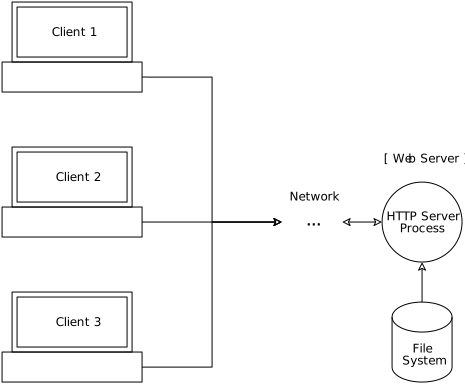
A web server is the point through which every HTTP request enters before reaching (or not) the application. The application, also called the backend or application server (Node.js, PHP-FPM, Tomcat, Gunicorn), runs the business logic. The web server takes care of everything around it. A modern web server typically takes on six functions:
- Serve static content: it delivers HTML, CSS, JavaScript, images and videos straight from disk, without invoking application code.
- Proxy to dynamic applications: it forwards requests to PHP-FPM, Tomcat, Node.js, Gunicorn and similar.
- Balance load: it distributes requests among several application servers.
- Terminate TLS: it manages certificates and encryption at a central point, instead of spreading that task across each instance.
- Cache: it stores responses already produced to deliver them faster later, without repeating the work.
- Control access and security: it filters malicious traffic and applies authentication before the attack gets near the application.
Apache HTTP Server had its first release in 1995, so the category has more than three decades of use. When the web server answers before any application exists (for example, a 404 for a nonexistent file), it shows that it is a layer of its own, and the Server header of the response identifies which software answered. The following stages go deeper into each function: proxy in Stage 03, Apache's MPMs in Stage 04, Nginx's architecture in Stage 05 and balancing in Stage 06.
Key concepts
Web server
software at the edge that receives HTTP requests and decides whether to answer on its own or forward to the application.
Backend
the process that runs the business rule; it should not take care of TLS, static files or traffic filtering.
Static content
a ready file served straight from disk, without application code.
Proxy to a dynamic application
the web server passes to the backend what only the backend knows how to answer.
TLS termination
the encryption is opened at a single point, and certificate renewal stops touching the application.
Server header
it identifies the software that answered and lets you quickly find out who is in front.
A minimal web server and the Server header
The block below shows the syntax of an Nginx configuration that serves a static page. It is illustrative: the official Nginx image already starts with an equivalent configuration, so you do not need to create this file to do this stage's exercise.
# default.confserver {listen 80; # the port Nginx listens onserver_name localhost; # the name this block serveslocation / { # rule for all URLs that start with "/"root /usr/share/nginx/html; # the folder where the static files areindex index.html; # file served when the URL ends in "/"}}
Each location is a routing rule. There is no application behind it here: it is static content served directly by the web server. The curl -I command shows only the response headers, and Server reveals who answered.
Essential commands for this stage
stable tag moves; pin the version when you need to reproduce a result)Hands-on
- Start both containers:
docker run -d --name nginx-lab -p 8080:80 nginx:stableanddocker run -d --name apache-lab -p 8081:80 httpd:2.4. - Run
curl -I http://localhost:8080andcurl -I http://localhost:8081. Observe theServerheader of each one and the200 OK. - Ask for a path that does not exist (
curl -I http://localhost:8080/nao-existe) and observe the404 Not Found. That response came from the web server, with no application having been invoked. - Run
docker logs nginx-laband observe the access lines with your requests, including the one that resulted in a 404. - Clean up:
docker rm -f nginx-lab apache-lab.
Tip: Use curl -I to inspect only the headers. It is the fastest way to find out which server is answering before going deeper into an investigation. Remember that the Server header also reports the software version, which is useful to you and to whoever attacks; Stage 14 shows how to hide the version.
Takeaway: A web server does not run the business rule: it takes care of everything around it (static content, proxy, TLS, cache, security) so that the application does not have to.
Stage 02 protocol evolution
HTTP and its evolution, from 1.1 to HTTP/3
The problem
Two scenes explain why HTTP needed to evolve. In the first, an e-commerce product page loads the main HTML and 40 more image thumbnails. Even with persistent connections (keep-alive), HTTP/1.1 processes one request at a time within a connection: the second image only starts downloading after the response to the first has finished arriving. Browsers partly work around this by opening several parallel TCP connections to the same domain (usually about six), but that only trades one cost for another, because now there are several connections to manage.
In the second scene, even with the first one solved, a user on an unstable mobile network still feels slowness. It takes just a single packet getting lost on the way for the whole load to stall until the retransmission arrives, even though all the other packets have already reached the destination.
The first scene motivated HTTP/2. The second motivated HTTP/3.
The concept
Before the versions, a structural fact: HTTP is a stateless protocol. Each request is handled independently, with no memory of the previous ones. This simplifies scaling, but requires mechanisms on top of the protocol (cookies and sessions) to keep the context of the same user.
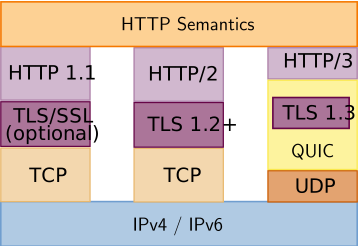
- HTTP/1.1 (1997): it introduced persistent connections (keep-alive), allowing several requests and responses on the same TCP connection and reducing the cost of opening a new connection per resource. The limitation is head-of-line blocking: if the first request is slow, the following ones on the same connection wait.
- HTTP/2 (2015): it solves the head-of-line blocking of the first scene, at the application layer. Several requests and responses (streams) travel at the same time over the same TCP connection, with none blocking another. It also brought resource prioritization, header compression (HPACK) and Server Push, which fell out of use because the main browsers removed or restricted support, since the gain rarely justified the complexity. On the web, HTTP/2 is used over TLS, and client and server agree on the version during the TLS handshake (ALPN extension).
- HTTP/3 (QUIC over UDP): HTTP/2 solved the problem in the application, but TCP guarantees that bytes arrive in strict order. If a packet is lost, everything that came after it waits for the retransmission, even if it belongs to another stream. HTTP/3 replaces TCP with QUIC, which runs over UDP: each stream is independent, and the loss of a packet only delays the affected stream. QUIC also combines the transport handshake with the TLS 1.3 one, which tends to establish the connection faster. The gain is larger on networks with packet loss or high latency, such as mobile connections.
In practice, the client discovers that the server offers HTTP/3 through the Alt-Svc response header. Networks that block UDP on port 443 make the client fall back to HTTP/2 or HTTP/1.1.

HTTP/2: the red and green streams share the same TCP connection. If one link is lost, everything after it waits for the retransmission, whichever stream it belongs to.

HTTP/3: in QUIC, each stream is an independent chain, and losing a link only delays the chain it was in.
Key concepts
Stateless
each request is independent; cookies and sessions simulate context on top.
Keep-alive (HTTP/1.1)
it reuses the TCP connection, but serves one request at a time on it.
Head-of-line blocking
a slow item holds back the ones that come after it in the same line.
Multiplexing (HTTP/2)
several streams on the same TCP connection; it solves the blocking in the application.
QUIC (HTTP/3)
independent streams over UDP; it solves the blocking in the transport.
ALPN and Alt-Svc
ALPN negotiates h2 during the TLS handshake; Alt-Svc announces HTTP/3.
Asking curl which version was negotiated
# Lets curl negotiate freely and shows the version used (approximate output)$ curl -so /dev/null -w 'Protocolo negociado: HTTP/%{http_version}\n' https://www.cloudflare.comProtocolo negociado: HTTP/2# Forces HTTP/1.1, even if the server supports newer versions$ curl --http1.1 -so /dev/null -w 'Protocolo negociado: HTTP/%{http_version}\n' https://www.cloudflare.comProtocolo negociado: HTTP/1.1# Forces HTTP/3 (requires a curl built with QUIC support)$ curl --http3 -so /dev/null -w 'Protocolo negociado: HTTP/%{http_version}\n' https://www.cloudflare.comProtocolo negociado: HTTP/3
Not every curl comes with HTTP/3 support (it depends on a QUIC library). Run curl --version | grep -i http3 to check before using --http3. The results depend on the chosen domain supporting each version and on your network allowing UDP. To see the negotiation happen on a server of your own, without depending on the internet, start an Nginx with HTTP/2 using a self-signed certificate.
Essential commands for this stage
h2.conf does not show up after the reloadHands-on
- Choose a domain that supports HTTP/2 (for example,
www.cloudflare.com) and run the first two commands of the example. Observe the value of%{http_version}changing according to the flag. - Run
curl -v --http2 https://www.cloudflare.com 2>&1 | grep -i "HTTP/2"and observe the line that confirms the version negotiated in the handshake. - If your curl supports HTTP/3, repeat with
--http3and compare-w '%{time_total}\n'across the three variants. Do not expect a large difference on a stable network. - Generate the certificate, create
h2.confand starth2-lab. ObserveHTTP/2on the first call andHTTP/1.1with--http1.1. - Delete the
http2 on;line from the localh2.confand rundocker exec h2-lab nginx -s reload. Repeat thecurlwith no flag and observe that the version goes back toHTTP/1.1, because the server stopped offering h2 in the handshake. Warning: the file is mounted individually in the container, and some editors andsed -ireplace the file with a new one instead of changing the original. In that case the container keeps seeing the old version and thereloadseems to do nothing; rundocker restart h2-laband repeat the test. - Clean up:
docker rm -f h2-lab.
Tip: HTTP/2 eliminated the queue at the application layer, and HTTP/3 solved the same problem at the transport layer. When diagnosing slowness, first ask at which layer the waiting happens.
Takeaway: Each HTTP version solved head-of-line blocking at a different layer: HTTP/2 in the application, with multiplexing, and HTTP/3 in the transport, swapping TCP for QUIC over UDP.
Stage 03 intermediaries
Forward proxy and reverse proxy
The problem
Two symmetric needs, one on the client side and the other on the server side. On the client side, a company wants all of its employees' outbound traffic to pass through a single control point, to block unwanted sites, record accesses for compliance and avoid exposing each machine's internal IP directly to the internet.
On the server side, the same company keeps five application servers behind a single public domain. It makes no sense to expose each server's IP, to repeat the TLS certificate configuration on each of them, or to let each server decide on its own whether it can take one more connection.
These are two different needs with one piece in common: an intermediary between whoever asks and whoever answers. The difference lies in which side the intermediary represents and protects.
The concept
Forward proxy, the outbound intermediary. It sits between a client (usually on a private network) and the internet, and is configured explicitly on the client side (browser, operating system or application). The flow is this: the client sends the request to the proxy indicating the destination; the proxy analyzes it and decides whether to forward or block it; if it forwards, it makes the request on the client's behalf; the response returns to the proxy, which passes it on to the client. For HTTPS, the client asks the proxy for a tunnel (the CONNECT method), and the proxy only sees the content if it does TLS inspection. Use cases: security and compliance, content control, anonymity (masking the client's IP) and cache. Squid is an example of software that fills this role.
Reverse proxy, the inbound intermediary. It sits at the edge of the infrastructure, receives requests from the internet and distributes them to the application servers behind it. It is transparent to the client, who does not even know it exists. The flow: the client sends the request to the proxy's public IP; based on rules, the proxy chooses the backend; it forwards the request; the backend answers the proxy; the proxy delivers the response to the client. Main functions: load balancing, centralized TLS termination (taking that load off the backends), cache, a first layer of security, compression (Gzip or Brotli) and routing between services. On security, the plain proxy filters certain traffic patterns, but blocking attacks such as XSS normally requires WAF rules (Stage 14).
The practical rule to tell the two apart: ask who configured the pointing to the intermediary. If it was the client, it is a forward proxy. If it was the server's infrastructure and the client does not know, it is a reverse proxy.
There is a consequence for the backend: it only sees the proxy opening the connection. To know who really made the request, the proxy passes on the client's IP in headers such as X-Real-IP and X-Forwarded-For (not standardized, but widely used; the standardized header is Forwarded). The backend should only trust these headers when they come from a known proxy, because a client can send them forged.
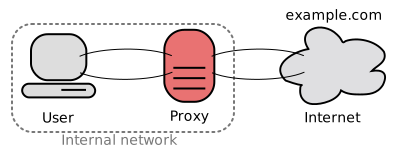
Forward proxy: the proxy sits on the client's network, and the client uses it to reach the outside. The external site only sees the proxy.
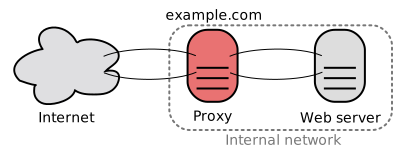
Reverse proxy: the proxy sits on the server's network, and whoever comes from the internet talks only to it, without knowing which server answered.
Key concepts
Forward proxy
on the client side, configured by the client, it represents the client to the internet.
Reverse proxy
on the server side, configured by the infrastructure, transparent to the client.
upstream
the group of backends to which the reverse proxy forwards.
proxy_pass
the Nginx directive that forwards the request to the backend.
X-Real-IP and X-Forwarded-For
headers that carry the original client's IP to the backend.
Host
without proxy_set_header Host, Nginx sends the backend the name of the upstream, not the domain the client used.
Nginx reverse proxy and Squid forward proxy in the same lab
First, a didactic backend in Python (standard library only). It returns its own name, the path received and, on /headers, the headers that arrived and the IP of whoever opened the connection. This same backend.py will be reused in the following stages.
# backend.pyimport osimport timefrom http.server import BaseHTTPRequestHandler, ThreadingHTTPServerNAME = os.environ.get("NAME", "backend") # name returned in the responsesPORT = int(os.environ.get("PORT", "3000")) # listening portDELAY = float(os.environ.get("DELAY", "0")) # artificial delay, in secondsclass Handler(BaseHTTPRequestHandler):protocol_version = "HTTP/1.1" # allows persistent connectionsdef responder(self, com_corpo):if self.path == "/slow":time.sleep(10) # simulates a stuck backendelif self.path != "/healthz":time.sleep(DELAY) # simulates a slow backendif self.path.endswith("/headers"):linhas = [f"peer: {self.client_address[0]}"] # who opened the TCP connectionlinhas += [f"{k}: {v}" for k, v in self.headers.items()]corpo = "\n".join(linhas) + "\n"else:corpo = f"{NAME} recebeu {self.path}\n"dados = corpo.encode()self.send_response(200)self.send_header("Content-Length", str(len(dados)))self.end_headers()if com_corpo: # HEAD does not send a bodyself.wfile.write(dados)def do_GET(self):self.responder(True)def do_HEAD(self):self.responder(False)ThreadingHTTPServer(("0.0.0.0", PORT), Handler).serve_forever()
Essential commands for this stage
nginx.conf does not show up after the reloadHands-on
- Create the
etapa03/folder withbackend.py,nginx.conf,squid.confandcompose.yaml, and rundocker compose up -d. Confirm the three services withdocker compose ps. - Run
curl -s http://localhost:8080/headersand observeX-Real-IP,X-Forwarded-ForandHost: localhost. Then runcurl -sI http://localhost:8080/and observeServer: nginx, even with the content coming from Python. - Delete the
proxy_set_header Host $host;line fromnginx.conf, rundocker compose exec nginx nginx -s reloadand repeat/headers. ObserveHost: backend_app, the name of the upstream, instead of the domain the client asked for. Warning:nginx.confis mounted as a single file, and some editors andsed -ireplace it with a new file, which leaves the container seeing the old version. If the change does not show up after the reload, rundocker compose restart nginx. - Restore the line, delete
proxy_set_header X-Real-IP $remote_addr;, reload and repeat. Observe thatX-Real-IPdisappears, butX-Forwarded-Forstill carries the client's IP, and thatpeershows Nginx's IP (thepeerwas always Nginx, because it is the one that opens the connection to the backend). Also delete theX-Forwarded-Forline, reload and repeat: without both headers, the backend only sees Nginx. - Restore the lines and run
curl -s -x http://localhost:3128 http://backend:3000/headers. Observe theViaandX-Forwarded-Forheaders added by Squid. Compare withcurl -s http://backend:3000/, which fails to resolve the name. - Clean up:
docker compose down.
Tip: To know which side you are on, ask who configured the pointing: if it was the client, it is a forward proxy; if the client does not know the intermediary exists, it is a reverse proxy. In production, configure the backend to trust X-Forwarded-For only when the connection comes from your proxy, because the header can be forged by any client.
Takeaway: The forward proxy sits on the client side and is configured by the client; the reverse proxy sits on the server side and is invisible to the client, and the original IP only reaches the backend if the proxy passes it on in headers.
Stage 04 processes + threads
Apache HTTP Server and the processing models (MPMs)
The problem
First scenario: an e-commerce site runs Apache with the oldest processing model and receives a peak of 5,000 simultaneous connections during a promotion. Since each connection gets an entirely separate operating system process, the server tries to open thousands of processes, each consuming tens of megabytes just to exist. Memory runs out, the system starts swapping to disk and the site freezes right at the sales peak.
Second scenario, the opposite: the same company depends on an old module, written without concern for concurrency (not thread-safe), that must keep working. Switching to a model based on threads that share memory would make that module corrupt data or bring down the process unpredictably.
One scenario asks for lightness to scale, the other asks for total isolation to survive. Apache resolves this tension by letting you choose the concurrency model, the MPMs (Multi-Processing Modules).
The concept
Before the models, two terms. A process has its own memory, isolated from the others; if it fails, the others carry on. A thread lives inside a process and shares its memory with the other threads, which makes it lighter and more dangerous: a serious error in one thread can corrupt the whole process. Code that works correctly when several threads run it at the same time is called thread-safe.
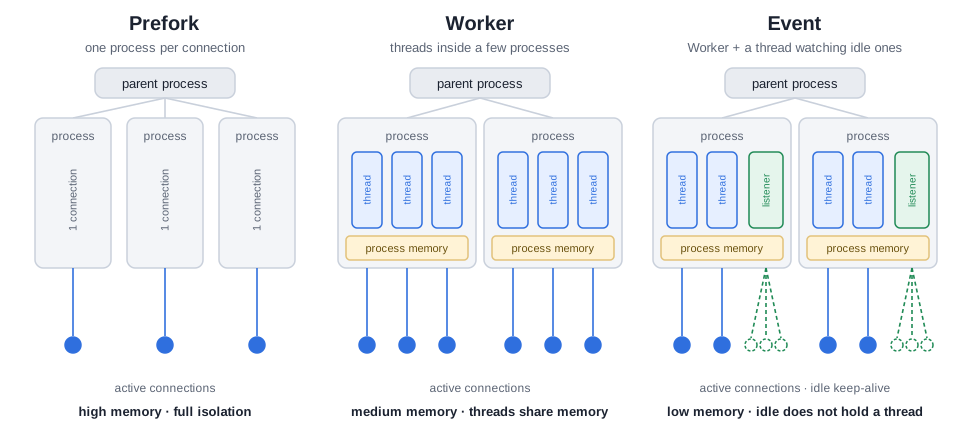
- Prefork (no threads): an independent child process serves each connection, completely isolated from the others. Advantages: very stable (a problem in one process does not affect the others), compatible with non-thread-safe modules and with legacy software. Disadvantages: high memory consumption and poor scalability under high concurrency. It is common to see Prefork with
mod_php(PHP embedded in the Apache process, historically not thread-safe). The alternative is to run PHP as a separate process, PHP-FPM, with Apache talking to it through a proxy (mod_proxy_fcgi, the same concept as Stage 03), which allows using a lighter MPM without losing compatibility. - Worker (with threads): it creates several child processes, each with several threads, and each thread serves one connection. It uses less memory than Prefork and supports more concurrency. Since the threads of a process share memory, a serious error in one of them can bring down the child process that hosts it and the connections it was serving; the other children and the master process stay up. That is why modules need to be thread-safe.
- Event (recommended for most new deployments): it starts from Worker, but is optimized for the common case of open, idle keep-alive connections. A dedicated thread can watch several connections that are only waiting, without tying a worker thread to each idle connection. It keeps the requirement of thread-safe modules and is the MPM recommended for HTTP/2, which Apache offers through the
mod_http2module (enabled witha2enmod http2andProtocols h2 http/1.1).
Two reading points for the comparison: memory consumption grows in the order Event, Worker, Prefork, and the supported concurrency grows in the opposite order. The choice, therefore, is always a trade between isolation and efficiency.
Key concepts
MPM
the module that defines how Apache serves connections in parallel (processes, threads or both).
Prefork
one process per connection; total isolation, high memory, low concurrency; it serves non-thread-safe modules.
Worker
a few processes with several threads; medium memory, high concurrency; it requires thread-safe modules.
Event
like Worker, but it does not tie a thread to idle keep-alive connections; low memory, very high concurrency.
Thread-safe
code that tolerates simultaneous execution by several threads in the same process.
PHP-FPM
PHP as a separate process, which lets you leave Prefork without abandoning PHP.
Finding and switching the active MPM
On an Apache installed on the host (Debian or Ubuntu), apachectl and a2query report the active MPM, and a2dismod and a2enmod do the switch.
# Shows the MPM in use (shortened output)$ apachectl -V | grep -i mpmServer MPM: event# On Debian and Ubuntu, a2query shows the enabled MPM module$ sudo a2query -Mevent# Switches to Prefork (for example, to run a legacy non-thread-safe module)$ sudo a2dismod mpm_event # disables the current MPM$ sudo a2enmod mpm_prefork # enables Prefork$ sudo systemctl restart apache2$ sudo a2query -Mprefork
On RHEL-based distributions, the switch is done by commenting and uncommenting the LoadModule mpm_*_module lines in /etc/httpd/conf.modules.d/00-mpm.conf, and the service is called httpd.
Essential commands for this stage
httpd -V)Hands-on
- Create the
etapa04/folder with theDockerfileabove, build the two images and start the two containers as in the example. - Confirm each one's MPM with
docker exec <container> httpd -M | grep mpm. Observempm_event_moduleandmpm_prefork_module. - In one terminal, run
ab -n 50000 -c 100 http://localhost:8082/(Prefork). In another, rundocker top apache-prefork | grep -c httpdseveral times during the test and observe the number of processes grow. - Repeat step 3 against
http://localhost:8081/(Event) andapache-event. Observe that the number of processes stays small, because each process holds several threads. Also comparedocker stats --no-stream apache-event apache-preforkat the end of the tests. The exact numbers vary; what matters is the difference in order of magnitude in the processes. - If you have an Apache installed on the host (
sudo apt install apache2), switch the MPM witha2dismodanda2enmod, restart the service and confirm withsudo a2query -M. - Clean up:
docker rm -f apache-event apache-prefork. Theapache-eventandapache-preforkimages stay on the computer and can be reused in Stage 05.
Tip: The difference between the three MPMs lies in process, thread and isolation, and it is this criterion that guides the choice in production. Before switching MPM on a real server, check that all loaded modules are thread-safe, because that is the restriction that decides the choice.
Takeaway: Prefork isolates each connection in a process and is the heaviest; Worker uses threads inside a few processes and requires thread-safe code; Event is Worker tuned so as not to spend a thread on idle keep-alive connections.
Stage 05 event loop
Nginx and the event-driven architecture
The problem
An application keeps many simultaneous connections, long-lived and almost always idle: real-time chat, push notifications, keep-alive from mobile app APIs. Even with the Event MPM reducing the cost of idle connections, Apache still reserves a thread for each request being processed. Scaling to tens of thousands of connections means scaling, in the same proportion, the number of threads and the memory they consume, until reaching the practical limit of threads that coexist efficiently.
Nginx was designed for this scenario. While Apache was born as a traditional web server and gained concurrency models over time, Nginx was born with an architecture aimed at serving static content and acting as a reverse proxy under high concurrency.
The concept
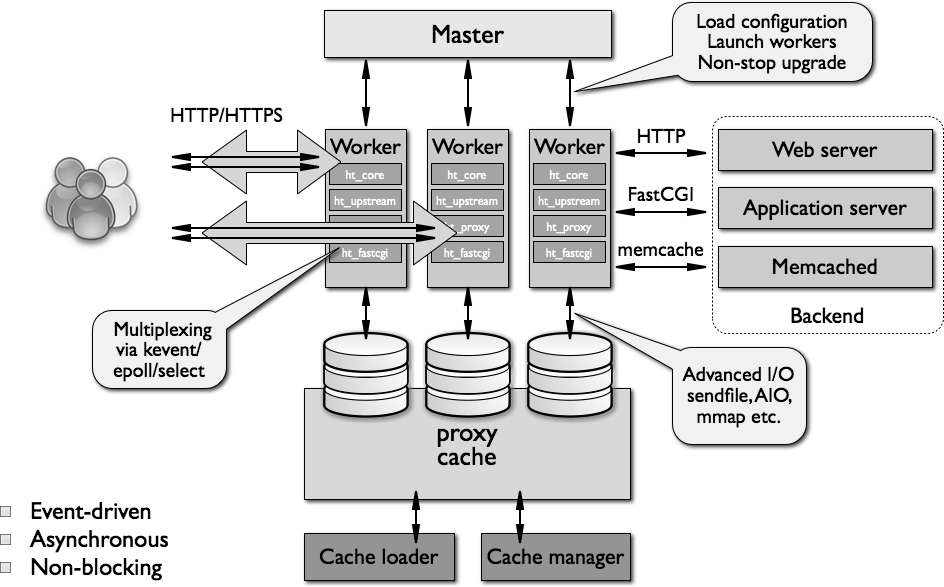
The central difference is the asynchronous, event-driven architecture, instead of a dedicated process or thread per connection.
A master process reads the configuration and manages the worker processes, which are the ones that serve connections (the master does not serve requests). Each worker runs an event loop: a loop that waits for events (new data on a connection, a response from a backend, a write becoming available), handles what became ready and goes back to the loop. When an input and output operation would have to wait (reading from disk, waiting for a backend), the worker does not stand still: it registers interest in that event and moves on to handle another connection. This is non-blocking I/O. When the event becomes ready, the worker is notified and resumes exactly where it stopped.
On Linux, the notification of which connections have new data comes from a kernel mechanism, epoll, which avoids scanning all connections on every cycle. Nginx picks the most efficient method available on its own, so the use epoll; directive is usually optional on Linux.
The practical result is that the number of processes stays stable and small (usually one worker per CPU core), while the number of connections grows. The limit stops being "one thread per connection" and becomes CPU, memory and file descriptors. Benefits: lower memory consumption, higher throughput, good latency and excellent performance as a reverse proxy and balancer, including in front of Apache itself. Be careful with the capacity calculation: worker_processes times worker_connections is the ceiling of simultaneous connections, but, when Nginx acts as a proxy, each client request uses two connections (one with the client and one with the backend), so the number of simultaneous clients is about half of that ceiling. In addition, worker_connections must not exceed the process's open file limit (adjustable with worker_rlimit_nofile).
Key concepts
Event-driven
a few processes handle many connections by reacting to events.
Non-blocking I/O
the worker registers the event and serves another connection instead of waiting.
Event loop
each worker's loop that handles the ready events.
master and worker
the master manages; the workers serve; the number of workers usually equals the number of cores (worker_processes auto).
epoll
a Linux kernel mechanism that tells which connections have new data.
worker_connections
the maximum number of simultaneous connections per worker, counting connections with backends.
Few processes, many connections
# nginx.conf (main excerpt)worker_processes auto; # one worker process per available CPU coreevents {worker_connections 1024; # each worker accepts up to 1024 simultaneous connectionsuse epoll; # optional on Linux: Nginx already picks the most efficient method}
On a 4-core machine, this configuration allows, in theory, up to 4096 simultaneous connections using only 4 workers (plus the master). If Nginx is acting as a proxy, count about half of that in simultaneous clients.
Essential commands for this stage
nginx.confHands-on
- Start the test Nginx with
docker run -d --name nginx-lab -p 8080:80 nginx:stableand rundocker exec nginx-lab nginx -T | grep -E 'worker_processes|worker_connections'. Observeworker_processes autoandworker_connections 1024. - Run
docker top nginx-laband count the worker processes. Compare withnproc: the number of workers is usually equal or close to the number of cores (the container sees the host's cores). - Run
ab -n 50000 -c 200 http://localhost:8080/and, during the test, repeatdocker top nginx-labin another terminal. Observe that the number of processes does not change, even with 200 simultaneous connections. - The
apache-preforkcontainer was deleted at the end of Stage 04, so recreate it withdocker run -d --name apache-prefork -p 8082:80 apache-prefork(the image is still on the computer; if you removed it, rebuild it withdocker build --build-arg MPM=prefork -t apache-prefork .in theetapa04/folder). Repeat the load onhttp://localhost:8082/and rundocker top apache-prefork | grep -c httpd. Observe the number of processes grow along with the load, unlike what happened with Nginx. - Compare memory consumption with
docker stats --no-stream nginx-lab apache-prefork. - Optional, on an Nginx installed on the host (
sudo apt install nginx): runnginx -tandps aux | grep '[n]ginx'and repeat steps 2 and 3 againsthttp://localhost/. - Clean up:
docker rm -f nginx-lab apache-prefork.
Tip: The central point is that a worker never waits standing still: it registers the event and moves on, and that is what allows Nginx to serve many connections without multiplying processes. When diagnosing a saturated Nginx, look at CPU, memory and the open file limit, and not at the number of processes, which barely changes.
Takeaway: Apache dedicates a process or thread to each request in progress (even when optimized by the Event MPM); Nginx uses a few workers with a non-blocking event loop, and that is why it is widely used as a reverse proxy and balancer in front of any backend.
Stage 06 L4 + L7 + algorithms
Load balancing: L4, L7 and Nginx algorithms
The problem
A single instance reaches its limit and the store starts losing orders on Black Friday. Increasing the CPU and memory of the same machine (vertical scaling) postpones the problem, but has a ceiling and is still a single point of failure. The way out is horizontal scaling: several identical backends. A question then arises that the application code does not answer: who decides, on each request, which backend receives the work? And by what criterion, if one backend is stronger than the other, or if some requests take a second and others ten milliseconds?
The concept
A load balancer distributes requests among the backends. The decision can use little or a lot of information, and that defines the layer it works at.
- L4 (transport): it decides with IP and port, over TCP or UDP. It is fast, serves generic protocols (databases, for example), but cannot route by URL, host or header because it does not even read HTTP. In Nginx, this is done by the
streammodule. - L7 (application): it understands HTTP and HTTPS. It can terminate TLS, apply cache and compression and route by host, path, header or cookie, with a slightly higher overhead.
In Nginx, the algorithms of the upstream block are:
- Round Robin: the default; it distributes in sequence. The
weightparameter changes the proportion for servers with different capacities (weight=2receives double). - least_conn: it sends the request to the backend with the fewest active connections. It is suitable when requests have very different durations.
- ip_hash: the same client tends to always land on the same backend, based on the IPv4 address (it uses the first three octets) or the IPv6 address (the whole thing). It helps applications with local state, but concentrates many users behind the same NAT or VPN on a single backend.
Affinity like that of ip_hash makes redistribution and scalability harder. Whenever possible, prefer stateless applications: session in Redis or a signed token (such as JWT) allow any backend to answer any request. Two directives complete the picture: keepalive reuses connections between Nginx and the backends (it requires proxy_http_version 1.1 and proxy_set_header Connection ""), and the timeouts proxy_connect_timeout, proxy_send_timeout and proxy_read_timeout limit each phase of the conversation with the upstream.
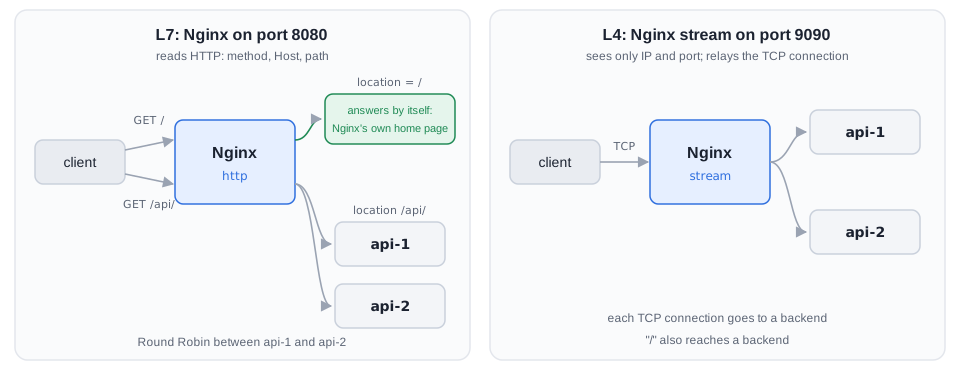
/ does not reach the backends. L4 only sees IP and port and relays each TCP connection, so / also reaches a backend.Diagram: made for this guideKey concepts
L4 and L7
L4 decides by IP and port (fast, generic); L7 understands HTTP (flexible, more cost).
Round Robin and weight
a simple sequence; weights for different capacities.
least_conn
it favors whoever has the fewest active connections; good for heterogeneous durations.
ip_hash
affinity by the client's IP; subject to imbalance behind a NAT.
Stateless
external session or signed token remove the need for affinity.
keepalive
it reuses connections with the backends and reduces the cost of opening new connections.
An upstream with an explicit decision
The lab has two backends (api-1 and api-2, the backend.py from Stage 03), an L7 Nginx on port 8080 and an L4 Nginx on port 9090. Copy the backend.py from Stage 03 to the etapa06/ folder.
# compose.yamlx-backend: &backend # template reused by both backendsimage: python:3.12-alpinecommand: ["python", "/app/backend.py"] # runs the didactic backendvolumes:- ./backend.py:/app/backend.py:ro # mounts the script read-onlyservices:api-1:<<: *backend # inherits the template aboveenvironment:NAME: api-1 # name returned in the responsesDELAY: "${API1_DELAY:-0}" # delay configurable by environment variable (default 0)api-2:<<: *backendenvironment:NAME: api-2nginx: # L7 balancer (HTTP)image: nginx:stableports:- "8080:80"volumes:- ./nginx.conf:/etc/nginx/conf.d/default.conf:rodepends_on:- api-1- api-2nginx-l4: # L4 balancer (plain TCP)image: nginx:stableports:- "9090:9090"volumes:- ./nginx-l4.conf:/etc/nginx/nginx.conf:ro # replaces the whole nginx.confdepends_on:- api-1- api-2
Essential commands for this stage
nginx.conf does not show up after the reload-k uses keep-alive; without it, ab opens one connection per request)api-1 with a 1-second delay per responseHands-on
- Create
etapa06/withbackend.py,compose.yaml,nginx.confandnginx-l4.conf, and rundocker compose up -d. - With Round Robin, run
for i in $(seq 1 30); do curl -s http://localhost:8080/api/; done | sort | uniq -c. Observe a split of 15 to 15. - Add
weight=2toapi-1, validate and reload (docker compose exec nginx nginx -tand thennginx -s reload) and repeat the count. Observe about 20 forapi-1and 10 forapi-2. If the split does not change, the container may be seeing the old version of the file (editors andsed -ireplace the mounted file with a new one); rundocker compose restart nginxand repeat the count. - Remove the weight, enable
least_conn;, reload and runAPI1_DELAY=1 docker compose up -d api-1. Reload Nginx again (the IP ofapi-1may have changed) and runseq 1 20 | xargs -P 10 -I{} curl -s http://localhost:8080/api/ | sort | uniq -c. Observe that the slow backend receives less new work (for example, 5 against 15; the numbers vary). - Replace
least_conn;withip_hash;, reload and repeat the count. Observe that all responses come from the same backend. Explain why: because of Docker's port mapping, all requests reach Nginx with the same source IP (that of the network gateway). It is the effect of many users behind the same NAT. - Compare L4 and L7: run
curl -s http://localhost:8080/andcurl -s http://localhost:9090/. Observe that only L7 answers on its own for a route, because only it reads the path. - Measure with
ab -n 1000 -c 20 -k http://localhost:8080/api/and noteRequests per secondand the mean time per request. Then describe in one sentence how Redis or JWT would eliminate the need forip_hash. - Clean up:
docker compose down.
Tip: Choose the algorithm by the behavior of the load: Round Robin distributes count, least_conn distributes occupancy and ip_hash distributes affinity. If you need affinity for the application to work, the problem lies in the state kept inside the backend, and the long-term solution is to take it out of there.
Takeaway: Balancing is not just spreading requests: it is choosing how much information the balancer sees (L4 or L7) and which signal it uses (sequence, weight, active connections or affinity) without creating a new bottleneck.
Stage 07 health checks + 502/504
Health checks, failover, metrics and diagnosis
The problem
During a promotion, one of the three backends freezes, but the process stays up. For the operating system everything is fine, and the balancer keeps sending a third of the requests to it. A third of the users receive an error or wait until the timeout, and the team only finds out because customers complain. A balancer needs to measure whether the service really answers, take out of rotation whoever does not answer, have a plan B and, when something goes wrong, show where the problem is with logs and metrics.
The concept
Health checks. In Nginx Open Source, the max_fails and fail_timeout parameters implement passive checking: failures observed in real requests temporarily take the backend out of rotation. With max_fails=3 fail_timeout=10s, three failures within 10 seconds take the server out of rotation for 10 seconds; after that Nginx tries it again and puts it back if the call works. Passive checking depends on real traffic: with no requests, there are no failures to observe. Active checks (periodic probes independent of traffic, with the health_check directive) are a feature of Nginx Plus, the commercial edition, or of external modules. A detail: in a group with a single server, max_fails and fail_timeout are ignored.
Failover and backup. When an attempt fails by connection error or timeout, Nginx tries the next server in the group (the default behavior of proxy_next_upstream), so the client does not always notice the failure. The backup parameter reserves a server that only receives requests when all the primaries are unavailable (it cannot be combined with ip_hash, hash or random).
Metrics. The stub_status module exposes active connections, total connections and accepted requests, and the reading, writing and waiting states. Apache Bench (ab) generates controlled load. Read together requests per second, latency, percentiles (the p95 shows the experience of the slowest ones, which the average hides), CPU and logs, to know whether the limit is in the proxy, in the backend or in a dependency.
Diagnosing 502 and 504. The 502 Bad Gateway error indicates that Nginx did not obtain a valid response from the upstream: connection refused, connection closed or invalid response. The 504 Gateway Timeout error indicates that the connection was made, but the backend did not answer within proxy_read_timeout. The investigation follows the path of the request: client, Nginx, backend, dependencies. Increasing a timeout without investigating may only hide slowness.
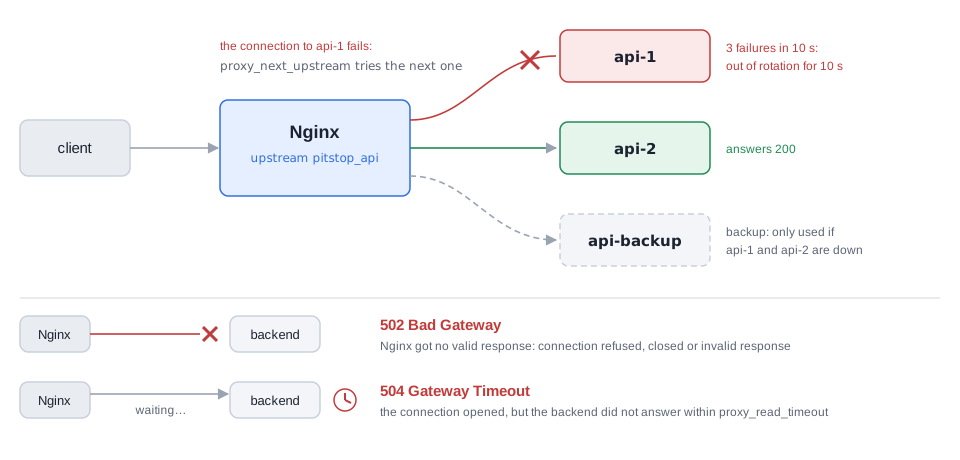
backup only receives traffic when no primary is left. Below, where each error comes from: 502 with no valid response, 504 with no response in time.Diagram: made for this guideKey concepts
Passive check (max_fails, fail_timeout)
failures in real traffic take the backend out for a while; available in Open Source.
Active check (health_check)
periodic probes; it requires Nginx Plus or an external module.
backup
a reserve server used only when the primaries fail.
proxy_next_upstream
defines on which failures Nginx tries another server in the group.
stub_status
a native panel with active connections and the reading, writing and waiting states.
502 and 504
502 is a failure to obtain a valid response (for example, connection refused); 504 is waiting beyond proxy_read_timeout.
Primary and backup backends, status panel and provoked errors
The lab has api-1, api-2, api-backup and an Nginx with routes to provoke 502 and 504. Copy the backend.py from Stage 03 to etapa07/.
# compose.yamlx-backend: &backendimage: python:3.12-alpinecommand: ["python", "/app/backend.py"]volumes:- ./backend.py:/app/backend.py:ronetworks: [lab]services:api-1:<<: *backendenvironment: { NAME: api-1 }api-2:<<: *backendenvironment: { NAME: api-2 }api-backup:<<: *backendenvironment: { NAME: api-backup } # only answers when the primaries failnginx:image: nginx:stableports:- "8080:80"volumes:- ./nginx.conf:/etc/nginx/conf.d/default.conf:ronetworks: [lab]depends_on: [api-1, api-2, api-backup]tools: # container only to run curl inside the networkimage: curlimages/curlentrypoint: ["tail", "-f", "/dev/null"]networks: [lab]networks:lab:ipam:config:- subnet: 172.30.0.0/24 # fixed subnet, used in the stub_status allow rule
Essential commands for this stage
Hands-on
- Create
etapa07/withbackend.py,compose.yamlandnginx.conf, and rundocker compose up -d. Confirm withfor i in $(seq 1 6); do curl -s http://localhost:8080/; donethat the responses alternate betweenapi-1andapi-2and never come fromapi-backup. - Run
ab -n 2000 -c 50 -k http://localhost:8080/and noteRequests per secondand the95%line of the percentile table. - In one terminal, run
for i in $(seq 1 60); do curl -s -o /dev/null -w '%{http_code} ' http://localhost:8080/; sleep 0.5; done. In another, rundocker compose stop api-1. Observe that all the codes stay 200, but that the first requests that land onapi-1may take a few seconds each (the connection attempt to an IP that disappeared from the network is not refused immediately; the times vary). Confirm indocker compose logs nginx --tail 30the lines with two upstream addresses (the first one failed) and, after the three failures ofmax_fails, only the address ofapi-2during the 10-second window. - Run
docker compose stop api-2andcurl -s http://localhost:8080/. Observeapi-backup recebeu /: with the primaries out, the reserve takes over, and the first call may take a few seconds for the same reason as in the previous step. - Run
docker compose start api-1 api-2, reload Nginx (docker compose exec nginx nginx -s reload) and repeat the loop from step 1. Observe the return of the primaries and the end of backup usage. - With
api-1up, provoke the two errors:curl -s -o /dev/null -w '%{http_code} em %{time_total}s\n' http://localhost:8080/quebradoand the same for/lento. Observe an immediate502and a504in about 2 seconds, and look for the cause withdocker compose logs nginx | grep -E 'refused|timed out|unreachable|No route'. - Query
docker compose exec tools curl -s http://nginx/nginx_statusduring anabrun and observeActive connectionsrising. - Clean up:
docker compose down.
Tip: Never change three timeouts at the same time. Reproduce the problem, change one variable, repeat the load and compare the same metric. And remember that the passive check only discovers the failure when a real client is affected by it: the first request that lands on a sick backend pays the price.
Takeaway: High availability begins when the edge detects an incapable backend, stops sending work to it and proves, with logs and metrics, that the user experience carried on.
Stage 08 host + path
Ingress on Kubernetes
The problem
In the cluster, each Service that needs to be reached from outside could get its own LoadBalancer. With ten services, that is ten external balancers, ten public IPs to manage, ten sets of rules and ten cloud costs. The existing Service types solve parts of the problem: ClusterIP exposes the service only inside the cluster, NodePort publishes a high port on each node and LoadBalancer usually creates one external balancer per Service. What is missing is a single entry point that understands HTTP and routes by domain and path.
The concept
The Ingress centralizes HTTP and HTTPS routing rules under a single entry point. It is only a declaration: an API object that says "host X and path Y go to Service Z". Whoever executes these rules is the Ingress Controller (ingress-nginx, Traefik, among others), which watches the Ingress objects and configures the real proxy that receives the traffic. Without a Controller, creating the Ingress object does not change the traffic.
- Host routing separates domains (
api.exemplo.comandapp.exemplo.com). Path routing separates paths on the same domain (/apiand/). pathType: Prefixaccepts the path and its subpaths;Exactrequires complete equality;ImplementationSpecificleaves the interpretation to the Controller (it is the type used when the path has a regular expression in ingress-nginx).- Annotations apply features specific to the Controller, such as URL rewriting. They apply to the whole Ingress, and not to a single path.
ingressClassNamechooses which Controller serves the rule when there is more than one in the cluster. - The destination Service remains a stable
ClusterIPfor the selected Pods. If the Service has no endpoints (ready Pods), the Ingress has nowhere to forward.
The Ingress remains stable, but its API is frozen (evolution happens in the Gateway API, gateway.networking.k8s.io, which Kubernetes recommends for new architectures). ingress-nginx, the Controller used in this lab, was retired by the Kubernetes project: the retirement was announced in November 2025 and maintenance ended in March 2026. It is still useful for studying the concept on Minikube, but for production prefer a maintained Controller or the Gateway API. This does not apply to the NGINX Ingress Controller maintained by F5, which is another project.

Path routing: the same entry address, and the URL path decides the Service. This is the case of this lab's /api.

Host routing: the request's Host header decides the Service. In both cases, the Ingress is only the rule; whoever executes it is the Ingress Controller.
Key concepts
Ingress
declaration of hosts, paths and destination Services (networking.k8s.io/v1).
Ingress Controller
the component that reads the Ingresses and configures the real proxy.
ingressClassName
chooses the Controller responsible for the rule.
pathType
Prefix, Exact or ImplementationSpecific.
rewrite-target annotation
rewrites the path before sending it to the backend; it applies to all paths of the same Ingress.
Service with endpoints
a prerequisite for the Ingress to work; without ready Pods, there is no destination.
One domain, two Services
The two Services (api and web) use the backend.py from Stage 03 (copy it to etapa08/), delivered to the cluster by a ConfigMap.
# apps.yamlapiVersion: apps/v1kind: Deploymentmetadata:name: api # "api" backendspec:replicas: 2 # two replicasselector:matchLabels:app: api # selects the Pods by labeltemplate:metadata:labels:app: api # must match the selectorspec:containers:- name: apiimage: python:3.12-alpine # image with Pythoncommand: ["python", "/app/backend.py"] # runs the didactic backendenv:- name: NAMEvalue: api # name returned in the responsesports:- containerPort: 3000 # backend portreadinessProbe: # only receives traffic when it answershttpGet:path: /healthzport: 3000volumeMounts:- name: codemountPath: /app # the script appears at /app/backend.pyvolumes:- name: codeconfigMap:name: backend-py # ConfigMap created from backend.py---apiVersion: v1kind: Servicemetadata:name: apispec:selector:app: api # forwards to the Pods with this labelports:- port: 80 # Service porttargetPort: 3000 # container port---apiVersion: apps/v1kind: Deploymentmetadata:name: web # same template, another namespec:replicas: 2selector:matchLabels:app: webtemplate:metadata:labels:app: webspec:containers:- name: webimage: python:3.12-alpinecommand: ["python", "/app/backend.py"]env:- name: NAMEvalue: web # the only field that changesports:- containerPort: 3000readinessProbe:httpGet:path: /healthzport: 3000volumeMounts:- name: codemountPath: /appvolumes:- name: codeconfigMap:name: backend-py---apiVersion: v1kind: Servicemetadata:name: webspec:selector:app: webports:- port: 80targetPort: 3000
URL rewriting applies to all paths of the Ingress in which the annotation appears, so the /api route (with rewriting) and the / route (without rewriting) go in two separate Ingress objects.
Essential commands for this stage
lab profilehelm repo add for the ingress-nginx repository)kubectl get endpoints api also works, with a deprecation warning in recent versions)nginx.conf that the Controller generated from the IngressesHands-on
- Start the cluster and the Controller:
minikube start -p lab,minikube addons enable ingress -p laband thekubectl waitabove. Observe theingress-nginx-controllerPod inRunningand confirm thenginxclass withkubectl get ingressclass. - Create the ConfigMap (
kubectl create configmap backend-py --from-file=backend.py) and applyapps.yamlandingress.yaml. Confirm the Pods withkubectl get podsand the endpoints withkubectl get endpointslices. - Open the port-forward in another terminal (
kubectl port-forward -n ingress-nginx svc/ingress-nginx-controller 8080:80, which stays in the foreground) and, in the original terminal, runcurl -s -H 'Host: pitstop.local' http://127.0.0.1:8080/api/healthand the same for/. Observeapi recebeu /health(the/apiprefix was removed by the rewrite) andweb recebeu /. - Test
/statusand/status/extrawith the sameHostheader. Observe thatExactmatches only the exact path and that the subpath falls into the frontend's/rule. - Run
kubectl exec ... cat /etc/nginx/nginx.conf | grep -n pitstop.localand observe that the Controller turned the Ingress objects intoserverblocks of a real Nginx. - Provoke a failure:
kubectl scale deployment api --replicas=0and repeat/api/health. Observe the Controller's503response (Service without endpoints) and restore with--replicas=2. - End the port-forward (Ctrl+C in the other terminal) and delete only the rules:
kubectl delete -f ingress.yaml. Keep thelabprofile, the appliedapps.yamland thebackend-pyConfigMap, because Stage 09 uses thewebService. The full cleanup comes at the end of Stage 09.
Tip: When debugging, follow the order: Controller running, correct ingressClassName, rule recognized (kubectl describe ingress), Service with endpoints and a healthy Pod. The cause is usually in the last two items, not in the Ingress.
Takeaway: The Ingress declares a shared HTTP entry by host and path; the Controller turns that intent into a real proxy, and nothing works without a Service with healthy endpoints behind it.
Stage 09 cert-manager
TLS and cert-manager
The problem
The store's site runs on HTTPS, and the certificate expires in 90 days. Someone needs to remember, generate the request, prove to the authority that the domain belongs to the company, install the file and reload the server. With dozens of domains and services created and removed all the time in the cluster, this does not scale. An expired certificate takes access away from all users with a security warning in the browser.
The concept
TLS offers confidentiality, integrity and server authentication. cert-manager extends the Kubernetes API with declarative resources to issue, store and renew certificates automatically.
- Issuer issues certificates within a namespace; ClusterIssuer serves the whole cluster. They define the issuing authority (self-signed, an internal CA or ACME).
- Certificate declares the DNS names, the duration and the Secret that will receive the private key and the certificate.
- With ACME (the protocol used by Let's Encrypt), an HTTP-01 challenge (publishing a token at a path of the site) or DNS-01 (publishing a TXT record) proves control of the domain. cert-manager tracks the validity and renews before expiry (by default, the duration is 90 days and renewal starts when a third of it remains).
- The Ingress references the TLS Secret. With the
cert-manager.io/cluster-issuerannotation, cert-manager creates the Certificate on its own from the Ingress'stlsblock. - On the connection, the client states the name of the site it wants right at the start of the handshake (SNI), and that is why a single Controller can present the right certificate for each host.
The private key stays in the cluster and must not be written to manifests or repositories. A Secret is base64-encoded, and that is not encryption: the protection comes from access control (RBAC) over the Secrets.
The ACME challenge requires a public domain reachable by the authority, so Let's Encrypt can only be practiced with a real domain. The lab uses a self-signed ClusterIssuer, which exercises the same path (Ingress, Certificate, Secret, renewal) without depending on the public internet. When using Let's Encrypt for real, start with the staging environment to avoid the issuance limits.
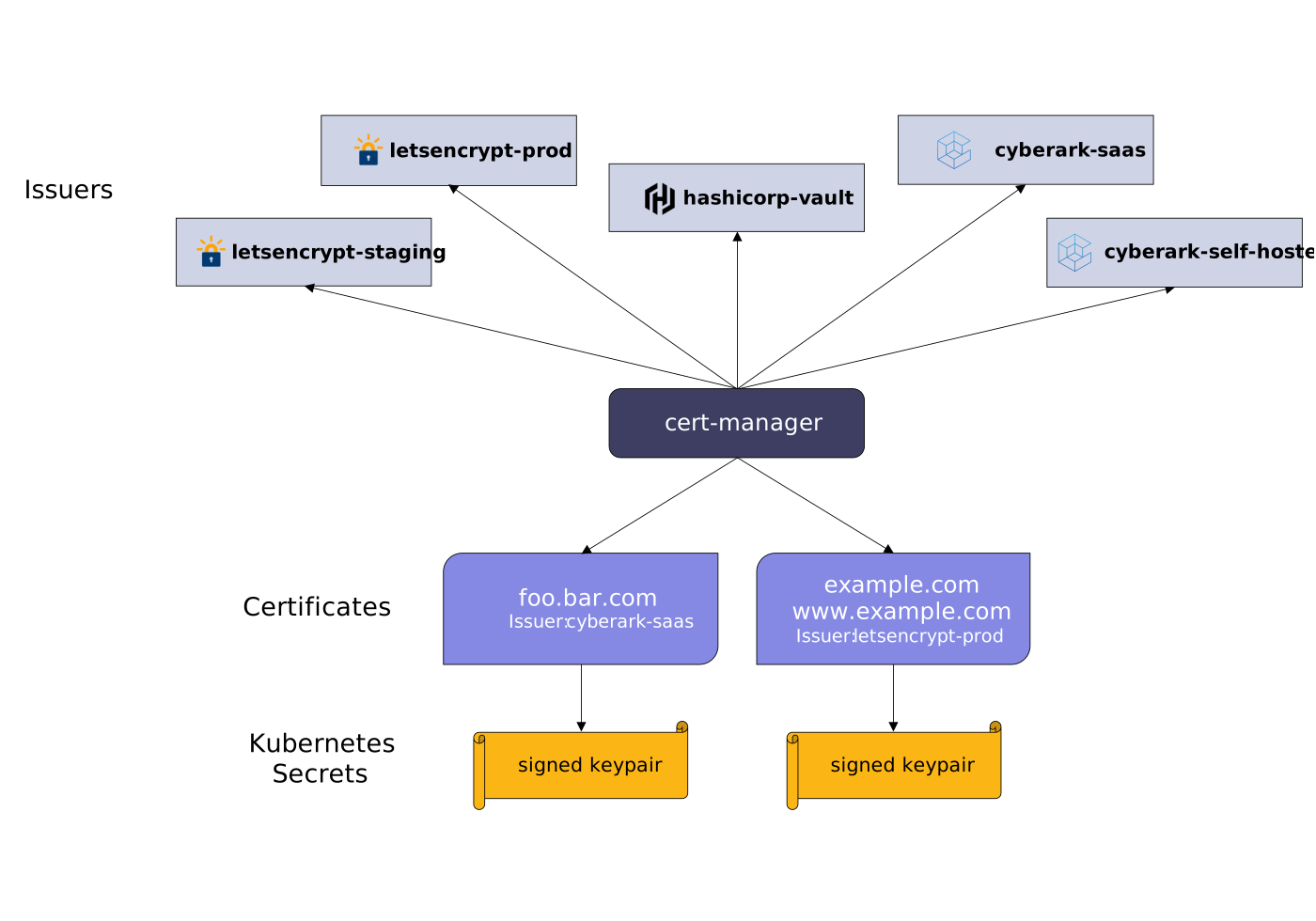
Key concepts
Issuer and ClusterIssuer
define who issues the certificates (cert-manager.io/v1).
Certificate
the request (DNS names, duration, destination Secret).
kubernetes.io/tls Secret
holds tls.crt and tls.key; it is what the Ingress uses.
ACME, HTTP-01 and DNS-01
protocol and challenges to prove ownership of the domain.
Renewal
automatic, before expiry (renewBefore).
Staging
Let's Encrypt's test environment, without the strict production limits.
Ingress integrated with cert-manager
# clusterissuer-selfsigned.yamlapiVersion: cert-manager.io/v1kind: ClusterIssuermetadata:name: selfsigned # name cited in the annotationsspec:selfSigned: {} # issues self-signed certificates (lab only)
Essential commands for this stage
-k accepts the self-signed certificatelab cluster at the end of the stage, before bringing up the mesh profile of Stage 10Hands-on
- In the
labcluster, confirm thatapps.yamland thebackend-pyConfigMap from Stage 08 are still applied (kubectl get svc web). If you deleted them, recreate them withkubectl create configmap backend-py --from-file=backend.pyandkubectl apply -f apps.yaml, using the files from theetapa08/folder. Install cert-manager with the threehelmcommands from the example and confirm the threeRunningPods withkubectl get pods -n cert-manager. - Apply
clusterissuer-selfsigned.yamlandingress-tls.yaml. Runkubectl get certificate -wand observeREADYgo fromFalsetoTrue. Confirm the Secret withkubectl get secret pitstop-tlsand observe thekubernetes.io/tlstype. - In another terminal, open the port-forward for port 443 (
kubectl port-forward -n ingress-nginx svc/ingress-nginx-controller 8443:443). In the original terminal, first runcurl -sk --resolve secure.pitstop.local:8443:127.0.0.1 https://secure.pitstop.local:8443/and observe theweb recebeu /response. Then run the same command with-vand2>&1 | grep -iE 'subject:|issuer:'and observe that the delivered certificate is no longer the Controller'sKubernetes Ingress Controller Fake Certificate(the cert-manager certificate does not define a common name, sosubjectandissuermay come empty; the site's name appears in thesubjectAltNameextension, which step 4 shows). - Inspect the Secret's certificate with the
opensslfrom the example and observe theissuer=line, the DNS name insubjectAltNameand the validity. - Apply
certificate-renova.yaml, wait about 6 minutes and runkubectl describe certificate renova-teste. Observe a renewal event andRevision: 2in the status. - Show that base64 is not encryption:
kubectl get secret pitstop-tls -o jsonpath='{.data.tls\.key}' | base64 -d | head -n 1shows the start of the private key in plain text. Explain which access controls (RBAC) protect the Secret. - Clean up everything from Stage 08 and this one: end the port-forward (Ctrl+C), run
kubectl delete -f ingress-tls.yaml -f certificate-renova.yaml,kubectl delete secret pitstop-tls renova-teste-tls,kubectl delete -f ../etapa08/apps.yaml,kubectl delete configmap backend-pyand, finally,minikube delete -p lab. Two clusters running at the same time are heavy, and Stage 10 brings up a new profile (mesh) with 4 CPUs and 8 GB.
Tip: When issuance gets stuck, read the Certificate's events and, with ACME, the Challenge's. The cause is almost always incorrect DNS, a wrong ingressClassName or a block on the HTTP-01 challenge path. Use staging while testing and only switch to production when DNS and route are correct.
Takeaway: cert-manager turns the certificate into a desired state: you declare domain and destination, and the controller issues, stores in the Secret and renews before expiry.
Stage 10 istio + sidecars
Service Mesh and Istio's architecture
The problem
An e-commerce application became twenty microservices. Every internal call is now a network call, subject to latency, failures and questions nobody answered: is the service that called who it says it is? How many times to retry before giving up? How do we know where the request got slow? Each team implements timeout, retry, encryption and telemetry in its own language, in a different way, and the network's behavior becomes inconsistent. A Service Mesh moves these policies to centrally controlled proxies.
The concept
In Istio's sidecar model, an Envoy proxy is injected into each Pod, next to the application container, and intercepts inbound and outbound traffic. The application stays focused on the business rule.
- The Data Plane is made up of the Envoy proxies: they process the requests and apply routing, resilience, security and telemetry.
- The Control Plane is Istiod: it watches services and Istio resources, translates the high-level rules into Envoy configuration, distributes service discovery and issues the workloads' identities (certificates).
- Injection is enabled per namespace (
istio-injection=enabled) and happens when the Pod is created: Pods that already exist only get the sidecar when they are recreated (for example, withkubectl rollout restart).
The abstraction has a cost: each sidecar consumes CPU and memory, adds latency per hop and the mesh is an additional platform to update and diagnose. For a few services, the benefit may not pay off. Istio also offers ambient mode, without sidecars; this guide uses sidecars because the path of the traffic stays visible.
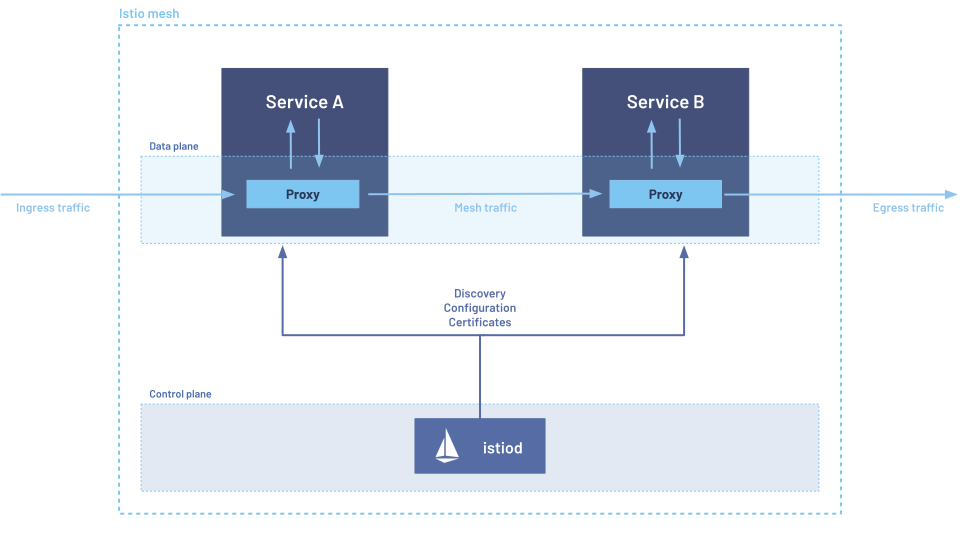
Key concepts
Service Mesh
a layer that standardizes retry, timeout, mTLS and telemetry outside the applications' code.
Envoy (sidecar)
the proxy beside each workload; it intercepts and processes the traffic.
Data Plane
the set of proxies that apply the policies.
Istiod (Control Plane)
distributes configuration, discovery and identities.
Injection per namespace
the istio-injection=enabled label and the recreation of the Pods.
Overhead
extra resources, one more hop and one more platform to operate.
Installation, injection and sidecar validation
The lab uses a demo namespace with an api application (version v1) and a web client. Copy the backend.py from Stage 03 to etapa10/ and run all the commands below from that folder.
# app.yamlapiVersion: v1kind: ServiceAccountmetadata:name: web # client identity (used in Stage 12)---apiVersion: apps/v1kind: Deploymentmetadata:name: api-v1spec:replicas: 1selector:matchLabels:app: apiversion: v1template:metadata:labels:app: api # label recommended by Istioversion: v1 # version: basis of the Stage 11 subsetsspec:containers:- name: apiimage: python:3.12-alpinecommand: ["python", "/app/backend.py"]env:- name: NAMEvalue: api-v1 # name returned in the responsesports:- containerPort: 3000volumeMounts:- name: codemountPath: /appvolumes:- name: codeconfigMap:name: backend-py---apiVersion: v1kind: Servicemetadata:name: apispec:selector:app: api # selects all versions of the apiports:- name: http # the name http tells the mesh the protocolport: 80targetPort: 3000---apiVersion: apps/v1kind: Deploymentmetadata:name: webspec:replicas: 1selector:matchLabels:app: webtemplate:metadata:labels:app: webspec:serviceAccountName: web # the client calls the api with the "web" identitycontainers:- name: webimage: curlimages/curlcommand: ["sleep", "86400"] # stays idle; we will use kubectl exec to call the api
Essential commands for this stage
SYNCED)istio-proxyHands-on
- Go into
etapa10/and run the first three commands of the example (download,cd istio-* && export PATH=$PWD/bin:$PATH && cd -andminikube start). Confirm withpwdthat you are back inetapa10/, install Istio withistioctl install --set profile=demo -yand observeInstallation complete. Runkubectl get pods -n istio-systemto seeistiodand the gateways inRunning. - Still in
etapa10/, create thedemonamespace, the ConfigMap and applyapp.yaml. ObserveREADY 1/1on both Pods, without a sidecar. - Enable injection, run
kubectl rollout restart deployment -n demoand observeREADY 2/2. Runkubectl get pod -n demo -l app=api -o jsonpath='{.items[0].spec.containers[*].name}'and observe theapiandistio-proxycontainers. - Run
istioctl proxy-statusand observe the proxies ofapi-v1andwebinSYNCED. Also run the reserved resources command and record the proxy's cost in CPU and memory. - Test the internal call:
kubectl exec -n demo deploy/web -c web -- curl -s http://api/. Observeapi-v1 recebeu /, now passing through two proxies. - Create the
legacynamespace without the label (kubectl create namespace legacy), copy the ConfigMap (kubectl create configmap backend-py --from-file=backend.py -n legacy) and applyapp.yamlwith-n legacy. ObserveREADY 1/1and explain where the mesh's policies stop acting: on Pods without a sidecar, no Istio policy is applied. - Keep the
meshcluster and thedemonamespace for Stages 11 and 12. Clean uplegacywithkubectl delete namespace legacy.
Tip: A Service Mesh does not fix bad code or a slow dependency: it standardizes the network's behavior and offers better signals to find the problem. Before adopting it, describe a scenario in your system in which the mesh's complexity would not pay off; if you cannot find any, you probably have not yet weighed the cost.
Takeaway: Istio separates communication from business: Envoy executes the policies in the Data Plane and Istiod coordinates configuration and identity in the Control Plane, at the cost of resources and operation.
Stage 11 canary + mirror
VirtualService, DestinationRule and gradual deployment
The problem
Version 2 of the orders API is ready. Releasing it to 100% of users at once is risky: an error that the tests did not catch brings down all sales, and the reversal requires a new deploy. It would be better to send a small fraction of real traffic to the new version, watch errors and latency and only then widen it. Splitting by exact percentage, or by characteristics of the request, is not something a Kubernetes Service knows how to do, because it distributes by the number of Pods.
The concept
In Istio, two rules work together. The DestinationRule names groups of Pods (subsets, selected by labels such as version: v1) and defines connection policies for the destination. The VirtualService decides how each call travels through those groups: weights, conditions by header or path, retries, timeouts, mirroring and simulated failures. The rules are applied by the client's sidecar, so they only apply to calls that go through a mesh proxy.
Three ways of testing a version:
- Canary by weight sends a small percentage of real traffic to the new version and widens it gradually. The weights of a route must add up to 100.
- A/B testing uses characteristics of the request (header, cookie, path) to segment users, for example always sending a test user to v2.
- Traffic mirroring duplicates the calls to the new version and discards its response: the client keeps receiving v1, and v2 receives real load with no risk to the user.
Resilience in the same resource: retries help with transient failures, but multiply the load if they are not limited. attempts is the number of new attempts after the first, perTryTimeout limits each attempt and the route's timeout limits the total time, which must accommodate all the attempts. Circuit breaking (in the DestinationRule, with outlierDetection) ejects endpoints that fail repeatedly, to avoid cascades. Fault injection (fault, with delay or abort) lets you test how applications react.
Weight is the delivery mechanism, not the success criterion: the decision to widen the canary comes from error rate, latency and business metrics.
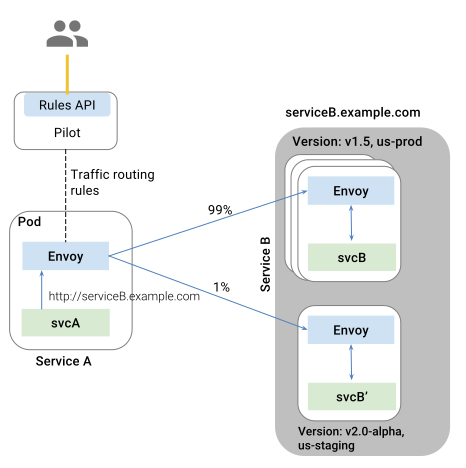
Key concepts
DestinationRule
defines subsets (groups by label) and destination policies (networking.istio.io/v1).
VirtualService
defines routes, weights, matches, retries, timeout, mirror and fault (networking.istio.io/v1).
Canary, A/B and mirroring
split by weight, segmentation by condition and copy of the traffic.
Retries and timeout
the total timeout must be greater than (attempts + 1) × perTryTimeout, because attempts does not count the first try.
Circuit breaking (outlierDetection)
ejects endpoints that fail in sequence.
Rule order
the first match that matches wins; the default route goes last.
Ninety percent v1, ten percent v2
First, version 2 of the application, equal to v1 except for the name and the version label.
# api-v2.yamlapiVersion: apps/v1kind: Deploymentmetadata:name: api-v2spec:replicas: 1selector:matchLabels:app: apiversion: v2template:metadata:labels:app: api # the "api" Service selects this Pod tooversion: v2 # distinguishes v2 from v1spec:containers:- name: apiimage: python:3.12-alpinecommand: ["python", "/app/backend.py"]env:- name: NAMEvalue: api-v2ports:- containerPort: 3000volumeMounts:- name: codemountPath: /appvolumes:- name: codeconfigMap:name: backend-py
Essential commands for this stage
Hands-on
- Apply
api-v2.yamland confirmREADY 2/2on bothapiPods. Runkubectl get endpointslices -n demo -l kubernetes.io/service-name=apiand observe two endpoints: the Service selects both versions. - With no VirtualService, count 100 responses with the loop from the example. Observe a split close to 50 and 50, the behavior of the plain Service.
- Apply
canary.yaml, runistioctl analyze -n demoand count 100 responses again. Observe about 90 for v1 and 10 for v2 (the split is statistical, so the numbers vary). - Send
curl -s -H 'x-usuario: teste' http://api/through thewebclient several times. Observeapi-v2in all the responses, and the same command without the header going back to the 90/10 split. - Apply
mirror.yaml, send 10 calls through the client and observe that all the responses areapi-v1. Then runkubectl logs -n demo deploy/api-v2 -c api --tail 12and observe the 10 requests reaching v2, even though the client does not receive its response. - Practice the rollback:
kubectl delete virtualservice api -n demoand count 100 responses. Observe the return to the Service's split. If something looks wrong, runistioctl analyzebefore attributing the deviation to the proxy. - Keep the cluster for Stage 12 and leave it without a VirtualService, as after the rollback in step 6. If you reapply
canary.yamlormirror.yaml, the Stage 12 responses will also come from v2 and the counters read only onapi-v1will differ from the ones shown there.
Tip: If all the traffic falls on a single version, check in this order: the Pods' labels against the subsets, the VirtualService's host against the Service, and the order of the match rules. Also remember that the rules only apply to calls made by a client with a sidecar; a client outside the mesh ignores the VirtualService.
Takeaway: The DestinationRule defines the available groups and the VirtualService decides how each call travels through those groups: together, they make gradual deployment observable and reversible.
Stage 12 identity + metrics
mTLS, authorization and observability in the mesh
The problem
The cluster is inside a private network, so "nobody from outside can call it". In practice, a single compromised or misconfigured Pod can call any other service, and internal traffic travels in plain text. In addition, when a request gets slow in a chain of five services, nobody knows which one consumed the time. An internal network is not a synonym for a trusted network, and it is necessary to authenticate who calls, restrict what they can call and see the path of the request.
The concept
Istio authenticates workloads with short-lived certificates issued by Istiod, encrypts traffic between sidecars with mTLS (both ends present an identity) and authorizes calls by identity, which is derived from the Pod's ServiceAccount (cluster.local/ns/demo/sa/web).
- PeerAuthentication controls mTLS.
PERMISSIVEaccepts traffic with and without mTLS and helps with migrations;STRICTrejects traffic without a mesh identity. The policy nameddefaultin a namespace applies to the whole namespace. - AuthorizationPolicy answers what an authenticated identity can do, by source, method and path. When an
ALLOWpolicy exists for a workload, every request that does not match any rule is denied (HTTP 403). - Observability: Envoy records volume, response code and duration of each call. Prometheus stores metrics, Grafana presents dashboards, Jaeger reconstructs traces and Kiali shows the topology, the errors and the mTLS state.
- Distributed tracing: the proxy creates and reads tracing headers, but the application needs to propagate them in the following calls (
x-request-id,x-b3-traceid,x-b3-spanid,x-b3-parentspanid,x-b3-sampled,x-b3-flags,b3and, for W3C,traceparentandtracestate). Without propagation, the trace breaks even with healthy sidecars. Collecting traces requires configuring a tracing provider in the mesh, which is outside the lab; here you check the headers and the metrics.
Authentication answers who it is; authorization answers what it can do. mTLS does not replace an access policy.
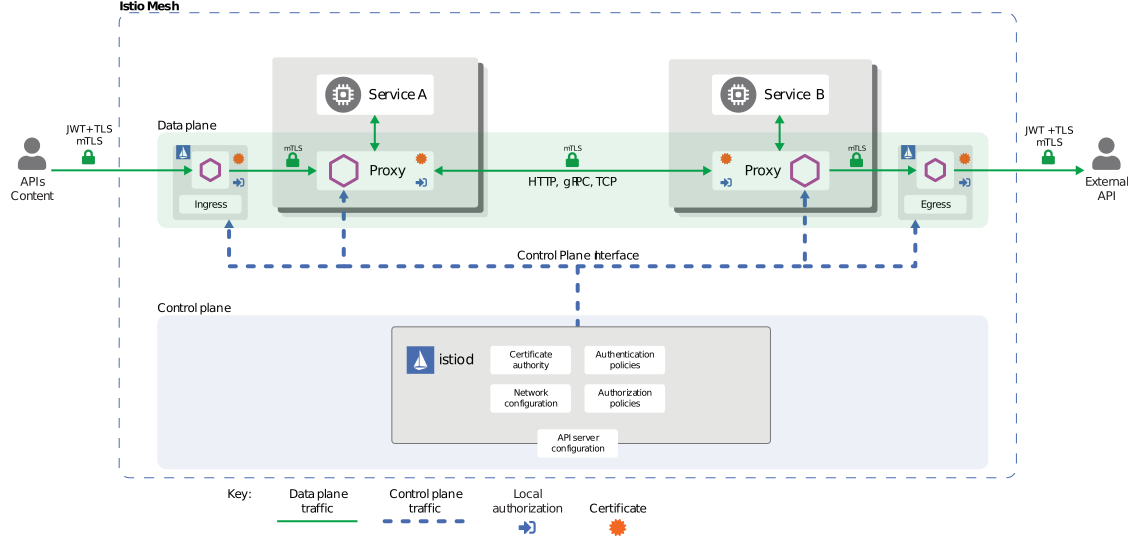
AuthorizationPolicy on each request is the proxy beside the Pod.Diagram: istio.io, Istio Authors, Apache 2.0Key concepts
mTLS
both ends authenticate and encrypt the hop between the sidecars.
PeerAuthentication (security.istio.io/v1)
PERMISSIVE mode (migration) or STRICT (requires the mesh).
AuthorizationPolicy (security.istio.io/v1)
allows minimal source, method and path; requests outside the ALLOW rules are denied.
Identity (principal)
derived from the ServiceAccount; it only exists when there is mTLS.
Envoy metrics
istio_requests_total records volume and response codes by source and destination.
Header propagation
the application's responsibility, indispensable for complete traces.
Strict mTLS, identity-based policy and metrics
The two policies live in separate files so that they can be applied and tested one at a time.
# mtls-strict.yamlapiVersion: security.istio.io/v1kind: PeerAuthenticationmetadata:name: default # policy for the whole namespacenamespace: demospec:mtls:mode: STRICT # rejects traffic without mTLS
Essential commands for this stage
demo namespacedefault and the ROOTCA)etapa10/, where Istio was downloaded): installs Prometheus and Kiali for the mesh graphkubectl port-forward -n istio-system svc/kiali 20001:20001)Hands-on
- With the
meshcluster, create thelegacynamespace and a test Pod without a sidecar (commands from the example). Call the api and observe that, inPERMISSIVE, the call without mTLS works. - Apply only the
PeerAuthentication:kubectl apply -f mtls-strict.yaml. Repeat the call fromlegacyand observe the refusal. Repeat the call throughweb(which has a sidecar) and observe that it keeps working. - Apply
outro.yaml(it already declaresnamespace: demo) and confirm that theoutroPod hasREADY 2/2. Before applying the policy, runkubectl exec -n demo deploy/outro -c outro -- curl -s -o /dev/null -w '%{http_code}\n' http://api/api/pingand observe200, because there is no authorization rule yet. Applyauthz-api.yaml, run the four calls from item 4 of the example and observe200only forGET /api/pingcoming fromweb, and403for another path, another method and another identity (outro). - Run the call to
/api/headersand observe that the proxy addedX-Request-IdandX-Forwarded-Client-Certwith the caller's identity. Explain why, for a complete trace, the application needs to copy these headers into the calls it makes itself. - Run
istioctl proxy-config secret deploy/api-v1 -n demoand read Envoy's metrics on the sidecar. Observeistio_requests_totalcounters separated by response code, including the403s you provoked. Since api-v2 also serves the Service, repeat the reading ondeploy/api-v2and add up the counters if the calls went to both. - Optional: install Prometheus and Kiali (
samples/addonsinside theistio-*folder inetapa10/), generate traffic with acurlloop and openistioctl dashboard kiali. Observe thewebtoapigraph and the mTLS padlock icon. - Clean up everything at the end of Stages 10 to 12:
minikube delete -p mesh.
Tip: Change one policy at a time and test both sides: a call that should pass and another that should fail. A STRICT that "works" only with the clients you remembered to test usually breaks the client you forgot.
Takeaway: In the mesh, identity and telemetry become properties of each hop: mTLS authenticates, the AuthorizationPolicy restricts by identity and observability explains the journey, as long as the application propagates the tracing headers.
Stage 13 slo + spof + vrrp
High availability: SLA, SLO, SPOF and redundancy
The problem
At 2 a.m., the machine hosting the store's only balancer loses its power supply. The ten backends are healthy, but nobody can reach them, because everything goes through that balancer. Another scenario: the contract promises 99.9% availability, and nobody can say how many minutes of unavailability that allows, nor how long the system's failover really takes. High availability begins with a measurable target, identifies the components whose failure takes everything down and chooses redundancy compatible with the cost and with the application's state. And it needs to be tested before the real incident.
The concept
- SLA is the external promise to the client, possibly with a penalty. SLO is the internal target used by engineering, usually stricter than the SLA. The error budget is what the SLO allows in failure over the period (100% minus the SLO). A target of 99.9% over 30 days allows about 43 minutes of unavailability.
- A SPOF (single point of failure) is any server, balancer, link, database or location whose failure interrupts the whole service. Components in series multiply availabilities (two 99.9% components give about 99.8%), while independent replicas in parallel improve them (two 99% ones give about 99.99%, if the failures are independent). SPOFs must be removed, reduced or explicitly accepted.
- Active-passive keeps a reserve instance and requires failover; it simplifies consistency. Active-active uses all the nodes at the same time and redistributes the load when one fails, but requires stateless applications or correct state synchronization.
- Keepalived with VRRP moves a virtual IP (VIP) between two balancers: the node with the highest priority and confirmed health answers for the VIP, and if it fails the other takes over. The configuration of both nodes must be kept in sync by automation (such as Ansible) or by declarative mechanisms. In many cloud networks VRRP does not work as on a local network, and the provider offers managed balancers or IP reassignment; check your provider's documentation.
- Health checks must verify the real function (for example, a valid HTTP response), not just the existence of the process.
- Chaos Engineering formulates a hypothesis, injects a controlled failure and measures the reaction, with clear criteria for aborting. It is not random failure in production.
- HA reduces local interruptions; Disaster Recovery (DR) recovers the service after broad events, such as the loss of a zone or region. The RTO is the maximum time accepted to recover and the RPO is the maximum data loss accepted, measured in time.
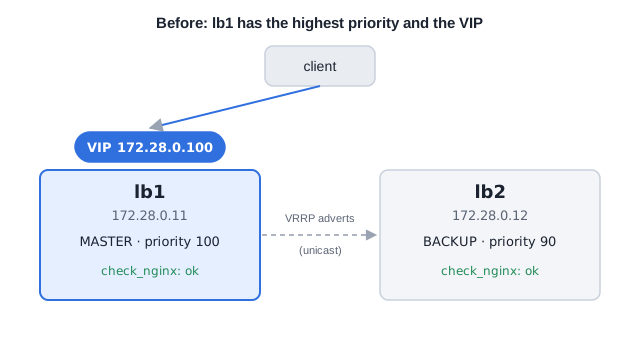
Before the failure: lb1 has the highest priority and a passing check_nginx, so it answers for the virtual IP.
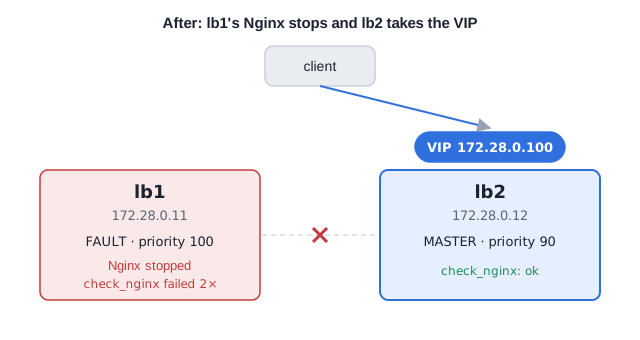
After nginx -s stop on lb1: two consecutive check_nginx failures take lb1 out of the role, lb2 takes the VIP, and the client keeps using the same address.
Key concepts
SLA, SLO and error budget
external promise, internal target and how much failure fits in it.
SPOF
a component whose failure takes everything down; in series, availabilities multiply.
Active-passive and active-active
a reserve waiting, or capacity shared among the nodes.
Keepalived, VRRP and VIP
the virtual IP migrates between balancers according to priority and health.
Chaos Engineering
hypothesis, controlled failure, measurement and abort criterion.
RTO and RPO
accepted recovery time and accepted data loss in DR.
Keepalived protecting the balancer
The lab starts two Nginx balancers (lb1 and lb2) on a Docker network with a virtual IP (172.28.0.100) and a client. Each node answers with its own name, which makes the failover visible.
# DockerfileFROM nginx:stable# keepalived does the VRRP; curl and iproute2 serve the health check and the IP inspectionRUN apt-get update \&& apt-get install -y --no-install-recommends keepalived curl iproute2 \&& rm -rf /var/lib/apt/lists/*
Essential commands for this stage
lb2)Hands-on
- Draw on paper the complete path of a request (client, DNS, balancer, application, database) and mark each component without redundancy. Each mark is a SPOF.
- Choose an availability SLO for the service and calculate the allowed monthly downtime with the
awkcommand from the example. Also calculate the availability of two 99.9% components in series. - Create
etapa13/with the example's files and rundocker compose up -d --build. Find out which node has the VIP and observeatendido por lb1when calling the virtual IP. - In one terminal, run the client loop. In another, stop
lb1's Nginx withdocker compose exec lb1 nginx -s stop. Observe responses fromlb1, one or two failures and then responses fromlb2, and measure how many seconds passed without a response. - Run
docker compose exec lb1 nginxand observe the VIP return tolb1(higher priority) after the health checks pass. Also record the state transitions indocker compose logs. - Write a Chaos Engineering hypothesis (for example, "if the active balancer goes down, the client loses at most 5 seconds of response") with an abort criterion (for example, "if the VIP does not migrate in 30 seconds, restore the node and end the experiment"). Compare the result of step 4 with the hypothesis.
- Clean up:
docker compose down.
Tip: A redundancy that has never been tested is still an assumption. Measure the failover time, the loss of requests and the recovery time, and compare with the SLO. If you cannot demonstrate the failover in a lab, you should not trust it in production.
Takeaway: High availability combines a measurable target, the removal of SPOFs, redundancy and testing; DR complements it when the failure goes beyond the server or the local zone.
Stage 14 modsecurity + rate limit
WAF, rate limiting and defense in depth
The problem
The store's login API receives, in the small hours, thousands of password attempts per minute coming from a few IPs, and some requests carry fragments of SQL in the search parameter. The network firewall blocks ports and networks, but does not understand what is inside an HTTP request: a SQL Injection payload arrives through a legitimate port (443) and passes. Availability still depends on legitimate access remaining reliable, so the edge needs to tell normal use from hostile behavior without bringing down real users.
The concept
Layer 3 and 4 firewalls block networks and ports, but do not inspect the application layer. A WAF (Web Application Firewall) inspects the HTTP content. ModSecurity (with the libModSecurity library and the connector for Nginx) is the engine that applies the rules, and the OWASP Core Rule Set (CRS) is a community-maintained rule base against patterns such as SQL Injection and XSS.
- The WAF evaluates the rules and accumulates an anomaly score; when it goes over a threshold, it blocks (by default in the CRS, the inbound threshold is 5). It can only log (
DetectionOnly) or block (On). Start in detection mode to adjust false positives before interrupting legitimate users. The CRS also has paranoia levels (from 1 to 4): higher levels detect more and generate more false positives. - TLS 1.2 or 1.3, HSTS and secure headers protect the channel and the browser. HSTS tells the browser to use only HTTPS for the domain for the time given in
max-age. - Rate limiting limits requests per key (usually the IP) and helps against brute force and abuse, but does not replace protection against distributed DDoS, in which each source sends little. In Nginx,
limit_req_zonedefines the key, the memory and the rate;limit_reqapplies the limit in a location;burstallows bursts andnodelayserves the burst without delay. The default rejection response is 503; uselimit_req_status 429to return429 Too Many Requests. Behind a NAT, several users share the same IP, and behind a CDN or proxy you need to configure the client's real IP. - Nginx and ModSecurity logs need to reach a central platform, with alerts for increases in blocks, 5xx responses and latency. Security depends on review, CRS updates and repeatable tests.
A WAF does not fix the vulnerability in the code: it reduces exposure and buys time for the definitive fix. Defense works in layers, each covering what the previous one does not see.
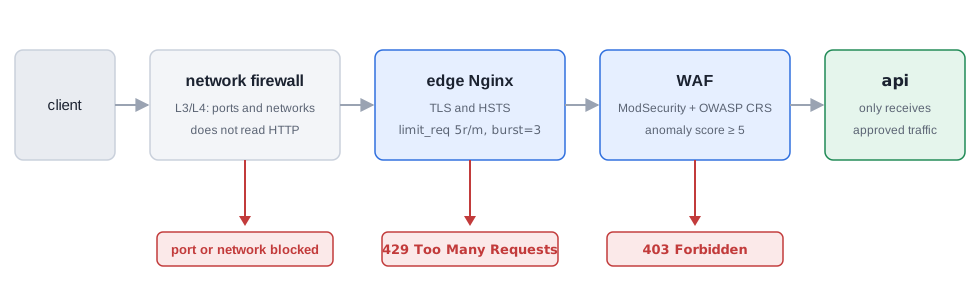
Key concepts
WAF (ModSecurity + CRS)
inspects HTTP content with rules and anomaly scoring.
DetectionOnly and On
log without blocking, and block; start by logging.
Rate limiting (limit_req_zone, limit_req)
controls abuse by key; limit_req_status 429 changes the rejection code.
TLS and HSTS
protect the channel and force the browser to use HTTPS.
403 and 429
403 comes from a WAF rule block; 429 comes from the configured rate limit.
Logs and alerts
turn blocks into evidence to adjust rules and respond to incidents.
A layered edge, with TLS, rate limit and WAF
The lab chains three containers: the edge Nginx (TLS, HSTS and rate limit), the WAF (the owasp/modsecurity-crs image, which runs Nginx with ModSecurity and CRS as a reverse proxy) and the backend. Copy the backend.py from Stage 03 to etapa14/ and generate a self-signed certificate as in Stage 02 (certs/ folder).
# compose.yamlservices:api:image: python:3.12-alpinecommand: ["python", "/app/backend.py"]environment:NAME: apivolumes:- ./backend.py:/app/backend.py:rocrs:image: owasp/modsecurity-crs:nginx # WAF: Nginx with ModSecurity and OWASP CRSenvironment:BACKEND: http://api:3000 # where the WAF forwards the approved trafficPORT: "8080" # WAF listening port inside the containerMODSEC_RULE_ENGINE: DetectionOnly # only logs; change to On to blockPARANOIA: "1" # CRS paranoia level (1 is the least sensitive)depends_on: [api]edge:image: nginx:stable # edge: TLS, HSTS and rate limitports:- "8443:443"volumes:- ./nginx.conf:/etc/nginx/conf.d/default.conf:ro- ./certs:/etc/nginx/certs:rodepends_on: [crs]
Essential commands for this stage
nginx.confnginx.conf does not show up after the reload (editors and sed -i replace the mounted file with a new one, and the container keeps seeing the old one)/var/log/modsec_audit.log or another path; check with docker compose exec crs env | grep -i audit)crs after changing MODSEC_RULE_ENGINEHands-on
- Create
etapa14/withbackend.py,compose.yaml,nginx.confand thecerts/folder, and rundocker compose up -d. Ifedgereturns502, check withdocker compose logs crswhich port the WAF listens on and adjustPORTand theproxy_pass. If you editnginx.conflater, rundocker compose exec edge nginx -s reloadand, if the change does not show up,docker compose restart edge. - Send a normal request (
curl -sk https://localhost:8443/) and observeapi recebeu /, passing through edge, WAF and backend. - With the WAF in
DetectionOnly, send the XSS payload and the SQL Injection one from the example. Observe the200and look indocker compose logs crsfor the rule triggered (a ruleidand the message). Identify the rule before enabling blocking. - Switch
MODSEC_RULE_ENGINEtoOn, rundocker compose up -dand repeat the payloads. Observe403. Send a normal request again and observe that it is still200. - Run the 10 consecutive calls to
/loginand observe the429s after the limit. Wait about 12 seconds and repeat one call to observe the limit releasing a slot. - Check the headers with
curl -sk -I https://localhost:8443/and observestrict-transport-security, and the absence of the version in theserverheader. - Build a checklist for your service: TLS 1.2 or 1.3, HSTS, CRS updates, log retention, alerts for spikes in blocks and 5xx, and a repeatable test of the payloads.
- Clean up:
docker compose down.
Tip: The WAF does not fix a vulnerability in the code: it reduces exposure and buys time, and the definitive fix remains in the application. Never enable blocking without having read the detection log for a period with real traffic, because the false positive that takes down a legitimate customer costs more than the delay in blocking.
Takeaway: A secure edge combines encryption, inspection at the application layer, rate control, logs and operational response: each layer covers what the previous one does not see, and all of them start by observing before blocking.
Stage 15 · review
Self-assessment checklist
Stage 01: Web server
- I can name the six functions of a web server without consulting the text.
- I ran an Nginx and an Apache and compared the
Serverheader of each. - I can explain why these functions should not live inside the application code.
Stage 02: HTTP
- I can explain what head-of-line blocking is and at which layer each HTTP version solves it.
- I used
curlto force HTTP versions and observed%{http_version}change. - I saw HTTP/2 being negotiated and disappearing when I removed
http2 on;in my Nginx.
Stage 03: Proxies
- I can say, for a scenario, whether it calls for a forward or a reverse proxy.
- I configured an Nginx reverse proxy and confirmed the headers received by the backend with
/headers. - I can explain the effect of removing
proxy_set_header Host,X-Real-IPandX-Forwarded-For, and whypeeralways shows the proxy. - I used a forward proxy with
curl -xand understood who opens the connection to the destination.
Stage 04: Apache and MPMs
- I can explain Prefork, Worker and Event in terms of process, thread and isolation.
- I confirmed an Apache's MPM with
httpd -Morapachectl -V. - I observed the difference in the number of processes between Prefork and Event under load.
- I can explain why non-thread-safe modules require Prefork.
Stage 05: Nginx
- I can explain non-blocking I/O, the event loop and the role of
epoll. - I located
worker_processesandworker_connectionsand compared the workers with the number of cores. - I observed that Nginx's number of processes does not grow with load.
- I can explain why, as a proxy, Nginx holds about half of the theoretical ceiling of connections.
Stage 06: Load balancing
- I can choose between Round Robin,
weight,least_connandip_hashexplaining the cost of each. - I measured the distribution among backends in each algorithm.
- I compared an L4 and an L7 balancer and explained what L4 does not see.
Stage 07: Failover and diagnosis
- I stopped a backend during the test and confirmed the failover through the logs, noting the delay of the first requests.
- I saw the
backupserver take over and the primaries come back. - I told 502 from 504 by the response time and by the error log message.
- I can say what Nginx Open Source does (passive check) and what requires Plus (active check).
Stage 08: Ingress
- I can explain why Ingress and Ingress Controller are not the same thing.
- I tested host and path routing,
PrefixagainstExactand URL rewriting. - I can explain why annotations apply to the whole Ingress.
Stage 09: TLS and cert-manager
- I followed the Certificate and the Secret until
READY Truewith a ClusterIssuer. - I validated the certificate delivered by the Ingress and read the DNS name and the validity with
openssl. - I can explain why base64 in a Secret is not encryption.
- I can tell the difference between HTTP-01 and DNS-01, what SNI is and why staging exists.
Stage 10: Istio
- I can separate Data Plane, Control Plane and the mesh's operational cost.
- I confirmed the sidecar injection (
2/2) and the sync withistioctl proxy-status. - I can explain why existing Pods need to be recreated after enabling injection.
Stage 11: Gradual deployment
- I configured subsets and a 90/10 split and measured the real proportion.
- I can tell canary, A/B and mirroring apart and I saw the mirroring reach v2.
- I practiced the rollback and can explain the relationship between
timeout,attemptsandperTryTimeout.
Stage 12: mTLS and observability
- I saw the refusal of a client outside the mesh in
STRICT. - I applied the
PeerAuthenticationand theAuthorizationPolicyin separate files and proved, with 200 and 403 responses, that authorization decides by identity, method and path. - I read Envoy's metrics and the identity in
X-Forwarded-Client-Cert. - I can explain why the application needs to propagate the tracing headers.
Stage 13: High availability
- I can relate SLA, SLO, error budget, SPOF, RTO and RPO.
- I calculated the monthly downtime allowed by an SLO.
- I measured the failover of a virtual IP with Keepalived.
- I wrote a Chaos Engineering hypothesis with an abort criterion.
Stage 14: Edge defense
- I tested the WAF first in detection, read the triggered rule and only then enabled blocking.
- I validated TLS, HSTS, the WAF's 403 and the rate limiting's 429.
- I can explain why
limit_req_status 429is needed and whatburstandnodelaydo.
Next steps: with all items checked, redo the labs without consulting the guide and then put the pieces together. On Docker, build an edge with two backends behind an Nginx with balancing, a backup server, rate limiting and a WAF, and protect that Nginx with a second node and Keepalived. On Minikube, publish the same application with Ingress and cert-manager TLS and do a 90/10 canary with Istio, measuring the real proportion and practicing the rollback.
Teacher's notes: technical precisions
- This block gathers details that help you read the examples safely. Nothing here changes the path of the exercises; they are clarifications about behaviors that tend to raise questions.
- About what you will see in the terminal
- Example outputs. The outputs shown are typical formats. Versions, IPs, Pod hashes, times, process counts and statistical distributions (such as the 90/10 split of the canary) vary. Compare the structure, not the exact text.
- Image tags. The labs use broad tags (
nginx:stable,httpd:2.4,python:3.12-alpine,owasp/modsecurity-crs:nginx). They move over time, and the behavior described holds for recent versions (for example,http2 on;requires Nginx 1.25.1 or higher). Pin exact versions when you need reproducibility, and confirm the availability of the images at the time of execution. - Upstream DNS in Nginx. Nginx resolves the names in
upstreamandproxy_passwhen it loads the configuration. If a container is recreated with another IP, reload (nginx -s reload). If a name does not resolve at startup, Nginx refuses to start. A container stopped withdocker compose stopdisappears from the network, and the connection attempt to the old IP usually fails with "No route to host" or with a connection timeout after a few seconds, instead of an immediate refusal; a closed port on a running container, on the other hand, is refused right away. - Client IP in Docker. Through port mapping, Nginx sees as the source the IP of the Docker network's gateway, and not that of your terminal. That is why
ip_hashsends everything to the same backend andlimit_reqcounts all of the lab's accesses as a single client. - Apache Bench.
abspeaks HTTP/1.0 by default and opens one connection per request;-kenables keep-alive. It does not do HTTP/2 or HTTP/3 and does not replace a realistic load tool. Use the numbers to compare scenarios on the same machine, not as an absolute measure. - `kubectl get endpoints`. In recent versions of Kubernetes, the command displays a deprecation warning in favor of EndpointSlices. The examples use
kubectl get endpointslices. - Single file mounted in a container. Mounting a file (such as
nginx.conforh2.conf) in a container ties the container to the host's original file. Editors that write to a new file andsed -ireplace the file, and the container keeps seeing the old version, so that thereloadseems to do nothing. In that case, restart the container (docker restart <name>ordocker compose restart <service>) or mount the whole folder instead of the file. - About Apache and Nginx
- Reach of the failure in the Worker MPM. A serious error in one thread can corrupt or bring down the child process that hosts it, and the connections it was serving. The master process and the other children keep working.
- HTTP/2 in Apache. It is offered by the
mod_http2module (Protocols h2 http/1.1) and is recommended for MPMs with threads, especially Event. It is not recommended with Prefork. - `MaxRequestWorkers` in Event. It limits the requests processed at the same time and must fit within
ServerLimittimesThreadsPerChild. Idle keep-alive connections do not each consume a worker thread, which is the whole point of Event. - Nginx capacity.
worker_processestimesworker_connectionsis a theoretical ceiling of connections, and a proxy uses two per request (client and backend).use epoll;is optional on Linux, because Nginx picks the most efficient method. - Open Source and Plus. Nginx Open Source offers balancing (Round Robin,
least_conn,ip_hash,hash,random),keepalivewith the backends,backupand passive checking (max_fails,fail_timeout). Features such as active checking (health_check), cookie-based session persistence (sticky cookie),slow_start, theleast_timemethod, the request queue (queue) and the dynamic configuration API with a monitoring dashboard are exclusive to Nginx Plus. - `limit_req_status`. The default response of
limit_reqis 503. To return 429,limit_req_status 429is necessary. Withrate=5r/mandburst=3 nodelay, the first request and the three of the burst pass; the following ones are rejected until a slot (one every 12 seconds) is released. - `add_header` and inheritance.
add_headerdirectives declared in alocationreplace the ones inherited from theserver. When adding a header in alocation, repeat the upper-level ones. - About Kubernetes and cert-manager
- Annotations and Ingress. The
rewrite-targetannotation with capture groups applies to all paths of the same Ingress, which is why the example separates the route with rewriting from the route without rewriting. Withrewrite-target, ingress-nginx starts treating the host's paths as regular expressions. - ingress-nginx and Gateway API. The ingress-nginx project was retired (announced in November 2025, maintenance ended in March 2026), and the Ingress API is frozen in favor of the Gateway API. Confirm the current state of the project and of your Minikube's
ingressaddon before using it; the concept of Ingress, Controller and Service with endpoints holds for any Controller. - cert-manager. The Helm installation uses
crds.enabled=truein recent chart versions (old versions usedinstallCRDs). The default duration of a Certificate is 90 days, with renewal starting when a third of the duration remains; the minimum duration is 1 hour and the minimumrenewBeforeis 5 minutes. The self-signed ClusterIssuer is for the lab only. The certificate issued for the lab defines only the DNS name (subjectAltName), sosubjectandissuermay appear empty inopensslandcurl -v. - Secret and base64. The content of a Secret is only encoded. Real protection comes from RBAC, from encryption at rest in
etcdand from not versioning keys. - About Istio, Keepalived and WAF
- Istio APIs. The examples use
networking.istio.io/v1(VirtualService and DestinationRule) andsecurity.istio.io/v1(PeerAuthentication and AuthorizationPolicy). Thev1beta1version still appears in old installations. Prefer full service names (api.demo.svc.cluster.local) in thehostfields, because short names are interpreted relative to the resource's namespace. - Retries and timeout.
attemptscounts the new attempts after the first; the route'stimeoutmust accommodate all the attempts. Unlimited retries multiply the load on a backend that is already sick. - Tracing. The sidecar generates the
x-request-idand reads tracing headers, but the application needs to propagate them. Collecting and viewing traces requires a tracing provider configured in the mesh, which is not part of the lab; Stage 12 checks the headers and Envoy's metrics. - Identity and authorization.
principalsin an AuthorizationPolicy only match when there is mTLS. With anALLOWpolicy in effect, whatever matches no rule is denied with 403. - Keepalived. The
track_scriptmust reference avrrp_scriptdefined in the same file. In production, useenable_script_securityand scripts with restricted permissions. The lab uses unicast VRRP over a Docker network; in cloud networks, VRRP usually does not work as on a local network. - WAF. The variables of the
owasp/modsecurity-crsimage (BACKEND,PORT,MODSEC_RULE_ENGINE,PARANOIA) and the audit log path may vary between image versions; confirm in its documentation. The rule identifiers shown (such as 941100) are examples and depend on the CRS version. The CRS's default inbound anomaly threshold is 5. - Rate limiting and DDoS. The per-IP limit helps against brute force and abuse, but does not replace protection against distributed attacks. Behind a CDN or proxy, configure the real IP module (
set_real_ip_fromandreal_ip_header) so that the limit's key is the client, and not the proxy. - Points to check for whoever runs the labs
- Third-party images.
ubuntu/squid,owasp/modsecurity-crs,curlimages/curlandpython:3.12-alpineare public images; confirm the availability, the name of the environment variables and the listening port of each one before running. - Minikube resources. Istio with the
demoprofile and the lab images require memory and CPU; adjust--cpusand--memoryto your machine. That is why thelabcluster from Stages 08 and 09 is removed before bringing up themeshprofile. - Keepalived on Docker. The Stage 13 lab depends on network
cap_addand on a Docker that grants them; environments without that permission (some rootless Docker setups and Podman) may not run it.